Photorealistic executive boardroom at dusk, floor-to-ceiling glass overlooking a modern city skyline, two senior business leaders standing in front of a massive digital operations wall displaying hundreds of interconnected AI agents spreading across departments, glowing network visualisation showing marketing, sales, finance, HR and operations agents multiplying rapidly across the organisation. On the left side of the screen, innovation metrics, automation workflows and productivity indicators glow in cool blue tones. On the right side, financial dashboards show rising consumption, increasing costs, budget forecasts and resource utilisation in subtle red and amber tones. The executives are studying the display together, one focused on growth and innovation, the other focused on financial sustainability. The giant screen dominates the scene. The atmosphere feels like a critical strategic discussion about the future of AI. Premium enterprise technology aesthetic, Microsoft-inspired design language, cinematic lighting, blue and purple AI glow, ultra realistic corporate photography, shallow depth of field, highly detailed, Fortune 500 boardroom, dramatic but professional, magazine cover quality, visual storytelling, no cartoon style, no empty space, no logos, no watermarks, no stock photo appearance, sophisticated and believable.

Do We Need AI FinOps for Microsoft Copilot?


This article has been written with the aid of Microsoft Copilot.

Over the last couple of years, we’ve been spending a lot of time building agents.

Some are simple. Some are quite sophisticated. Some are internal experiments and some are helping solve real business problems. Like many people working in this space, I’m trying to understand where AI is heading and, more importantly, what organisations need to be thinking about today.

One thing has started to become apparent.

Microsoft are moving from a world of fixed AI licensing to a world of AI consumption.

This is a big change; I think it could become one of the biggest changes organisations need to prepare for over the next few months.

And it has got me thinking more about the rise of AI FinOps and what we can do to help our customers.

We’ve Seen This Before

When cloud computing first became mainstream, many organisations struggled to adapt.

Traditionally, IT was relatively predictable. You bought servers. You bought software. You purchased licences. The costs were generally known upfront.

Cloud services changed this completely. Suddenly, organisations were paying for what they consumed: storage, compute, network traffic and databases.

The technology teams loved the flexibility. Finance teams sometimes had a different perspective when the invoices arrived.

This is where FinOps emerged.

FinOps helped organisations understand what they were consuming, why they were consuming it and whether they were getting value for the money that was being spent.

The goal was never simply to reduce costs. The goal was to maximise value.

I can’t help thinking that AI is about to follow a very similar path.

Why Copilot Changes the Conversation

Historically, most Microsoft 365 discussions have centred around user licensing.

How many users do we need? Who should get a licence? Have we assigned the licences correctly?

These are all sensible questions.

However, AI introduces another layer.

As Microsoft continues to expand the capabilities of Copilot, Copilot Studio, AI-powered development tools and agent experiences, we’re increasingly seeing consumption-based models emerge through Copilot Credits.

That changes the conversation.

The question is no longer simply: How many Copilot licences do we own?

It starts becoming: How much AI are we consuming and what value are we getting from it?

Those are very different questions.

What Is AI FinOps?

I suspect AI FinOps will eventually become a specialised extension of traditional FinOps.

Not because AI is completely different, but because the things we need to measure are different.

Instead of virtual machines and storage accounts, organisations may find themselves tracking things such as:

  • Agent execution
  • AI reasoning
  • Copilot Credit consumption
  • AI-powered processes
  • Usage patterns
  • Business outcomes
  • Value generated by AI workloads

Ultimately, the challenge remains the same.

How do we ensure we’re getting value from the resources we’re consuming?

The Challenge With Agents

One thing I’ve noticed whilst building agents is that we often focus on capability first.

Can the agent do the job? Can it solve the problem? Can it complete the user’s request?

Those are absolutely the right questions when you’re learning and experimenting.

However, once agents move from experimentation into production, another question starts becoming important.

Can the agent solve the problem efficiently?

For example, imagine a user asks an agent to build a solution.

A very capable agent might analyse requirements, design a data model, build an application, create workflows, produce documentation, generate reports and configure automation.

On the surface, this sounds fantastic.

However, what has happened behind the scenes? How many reasoning cycles did it perform? How many searches did it execute? How many tools did it invoke? Did it arrive at the answer directly or explore five different approaches before choosing one?

The user may only see the final result. The organisation may eventually care about the journey taken to get there.

Why Agent Optimisation Matters

This is where things start to get interesting, **well interesting to me**.

Historically, optimisation has been difficult.

A lot of the intelligence in an agent was buried inside prompts and instructions. As agents became more sophisticated, prompts became longer, instructions became more detailed, and workflows became more complex.

One of the challenges was simply giving the AI enough context to make good decisions.

What I’m starting to see from recent updates is a move towards architectures that make optimisation easier.

The latest developments in agents, orchestration and harness capabilities are creating opportunities to shape how agents reason and how they execute tasks.

That might not sound particularly exciting. But from an AI FinOps perspective, it could be hugely important.

A good optimisation strategy isn’t necessarily about using less AI. It’s about using AI more effectively.

An Interesting Example: Work IQ

One capability that I think will become incredibly important is Work IQ. This is Microsoft’s intelligence layer for accessing your work context.

Traditionally, AI spends a lot of effort trying to understand context.

Who should I talk to? What project is this related to? Where is the information? Which document is relevant? Which team owns this?

That investigative work has a cost.

The more effort required to find context, the more effort the AI has to expend before it can begin solving the actual problem.

What I find interesting about Work IQ is that it helps the AI understand the organisational environment more effectively.

If the AI can find the right people, projects, conversations and information more quickly, in a more succinct way, then it will need less effort to reach the correct answer.

Better context means less work.
Less work means lower consumption.
Lower consumption means better results and value.

I suspect this is one of those areas we’ll be talking far more about over the next few months.

From Adoption to Optimisation

A lot of organisations today are still focused on adoption.

How do we build agents? How do we deploy Copilot? How do we train our users? How do we identify use cases?

Those are still the right questions.

However, with the changes to usage-based pricing, the conversation quickly moves to cost optimisation.

We are already seeing this in practice. A couple of organisations have started building agents with the assumption that the activity would effectively be covered, only to discover that costs can appear unexpectedly or be higher than they had imagined.

Cost estimation is hard at the best of times, and Microsoft’s recent move towards more usage-based pricing through Copilot Credits makes this more likely and, unfortunately, somewhat inevitable. The lesson is not to stop building agents, but to treat cost modelling, monitoring and optimisation as part of the adoption journey from the outset.

How do we govern AI consumption? How do we measure value? How do we optimise agent execution? How do we manage Copilot Credits? How do we scale AI responsibly?

I think that shift is coming sooner than many people realise.

Where Do We Start?

My advice now is simple.

Don’t wait for AI FinOps to become a formally recognised discipline before thinking about it.

Start building agents. Start experimenting. Start learning. Understand what works. Understand what doesn’t. Measure outcomes. Pay attention to consumption patterns.

And most importantly, focus on business value rather than technical activity.

However, put in place a budget, what is a reasonable monthly cost?

Make sure you are adding controls around that budget so that you don’t have unexpected costs appearing and have controls in place so that do not become a surprise.

We have a budget at iThink 365, who are a 9-person organisation of around about £250 per user per month with some variance based on the user role.

Microsoft have started putting cost management controls in place, but they need to be better with more granular controls for specific products and instances of those products. For example, being able to allocate a budget for a specific Agent or product within Microsoft 365.

You can start to read up on those controls here:

Microsoft Azure Cost Management

Overview of Cost Management – Microsoft Cost Management | Microsoft Learn

Microsoft 365 Copilot Cost Management

Usage-Based Billing and Cost Management for Copilot Credits | Microsoft Learn

Power Platform Copilot Studio / Copilot Credit Cost Management

Manage Copilot Credits and capacity for Copilot Studio – Power Platform | Microsoft Learn

Summary

Ultimately, organisations won’t be successful because they run the most agents. They’ll be successful because they generate the most value from those agents.

And that’s why I suspect AI FinOps is going to become a very important conversation over the next few months.

At iThink 365, we’re already having these discussions with customers through our improvement packages and soon via our Agent Adoption Service.

Today, the focus is helping organisations to get started with agents. Tomorrow, I think it will increasingly be about helping them optimise, govern and scale them successfully.

It is going to be fascinating to watch how this space evolves.
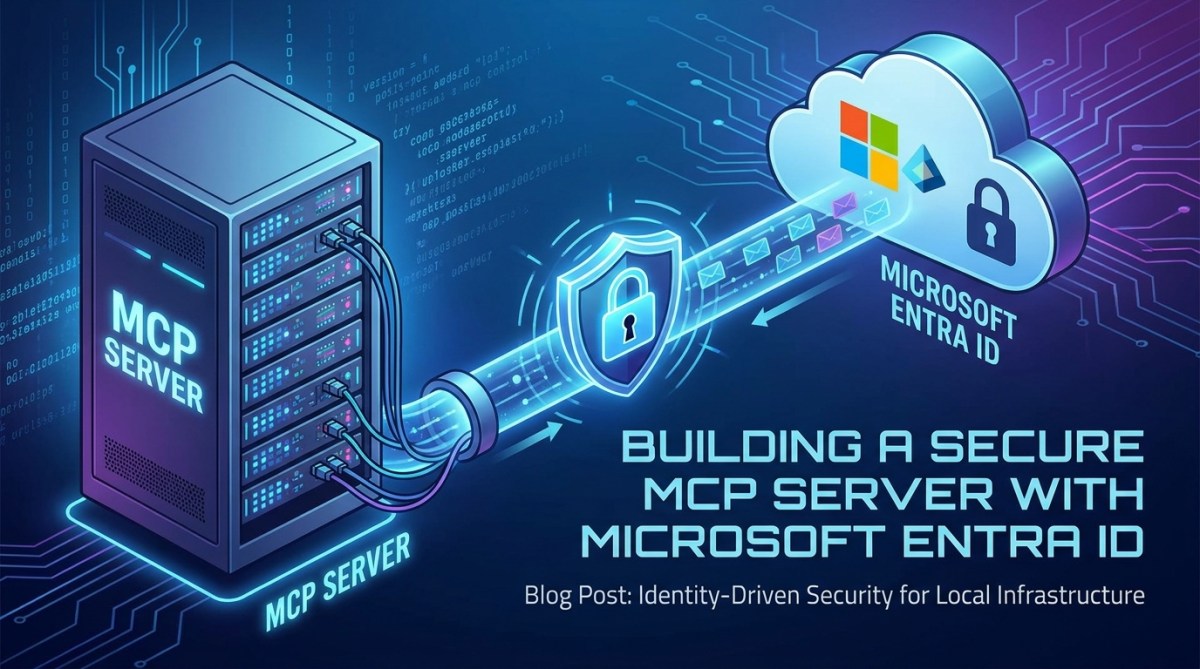
An image of an MCP Server rack seating behind a firewall

Building a Secure Custom MCP Server secured by Microsoft Entra ID


Introduction 

In this article, we will discuss the topic of building a custom MCP Server which is secured by Microsoft Entra ID.

This post builds on a previous blog post I wrote about setting up an MCP Server consumed by Copilot Studio. I would suggest that you read that post first.

Of course, all the source code for this secure MCP Server is provided, so you can use it to get going quickly.

Now, I will also point out another resource which was shared with the community on Tuesday, and that is Paolo Pialorsi’s Microsoft Community Call from the 26th May 2026, which you can find here: (580) Microsoft 365 & Power Platform weekly call – 26th of May, 2026 – YouTube. You will need to watch from about the 34th minute.

Why?

Firstly, why do we want to do this?

Well, Custom MCP Servers are the new way to extend your Agentic applications’ reach into your business systems or platforms to enable your organisation to do even more with platforms such as Microsoft 365 Copilot, Claude, Copilot Cowork, and more.

However, we need to make sure that these MCP Servers are secured, so that they do not leak organisation information.

Like your APIs or applications, you need to ensure that your MCP Servers are not accessible to everyone, including those who want to get into your organisation.

Often, your APIs and MCP Servers are sitting on public networks and are publicly accessible, and so we need to ensure that only the people that we want to be able to access the MCP Server can.

How?

Firstly, let’s create our MCP Server from the GitHub repository sample.

You can find the secure MCP Server sample on GitHub here:

microsoft365-dev-samples/copilot-secure-mcp-azure-containers at main · SimonDoy/microsoft365-dev-samples

To use, simply clone the repository to your local machine and then follow these instructions.

Setting up the Infrastructure

Once you have cloned the GitHub repository to your local machine, you will need to do the following.

Firstly, we need to set up two Microsoft Entra ID Applications, one to secure the MCP Server and one to be used as the MCP Client to connect to the MCP Server.

I am using the application name pattern [Organisation Name] [Product/Project] MCP Server ([Environment]).

e.g. iThink 365 Toggl MCP Server (Dev)

e.g. iThink 365 Toggl MCP Client (Dev)

I will assume you know how to create the Microsoft Entra ID Application, but there are some things we need to do to support various features of MCP Client, such as Dynamic Discovery and discovering Authentication requirements.

These are particularly important when using the very popular MCP Client test tool, MCP Inspector.

  • Browse to Entra ID (https://entra.microsoft.com)
  • Browse to your App Registrations
  • Add your application named as above, but don’t configure any of the client secrets, etc., yet. I will take you through that.

Once you have set up your Entra ID Application, let’s configure each one.

Setting up your MCP Server Entra ID Application

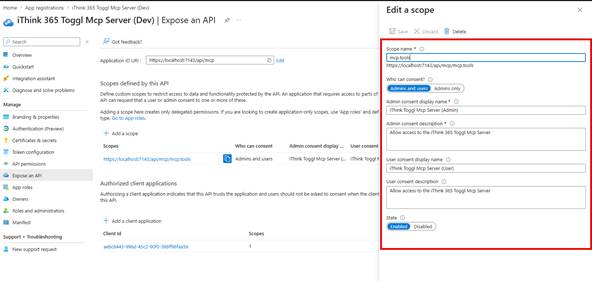
Firstly, we need to configure the MCP Server Entra ID application to expose an API.

  • From App Registrations
  • Open your Entra ID Application
  • Click on Expose an API
  • Take the default Application ID URL that is provided, which will be something like api://[your client id]
  • Add a scope called mcp.tools
  • Who can consent (Admin and users)
  • Provide names and descriptions for each of the Admin and User sections.

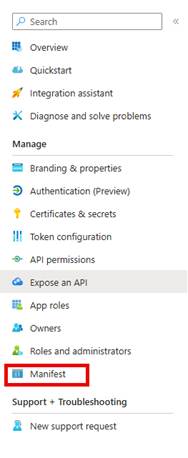
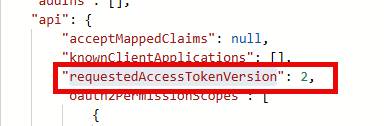
We need to configure the Entra ID application to use a different version of the Access Token. This is because MCP Clients like MCP Inspector expect to be able to use the URL of your MCP server as the Application ID URI.

  • Next, click on Manifest
  • Find the property “requestedAccessTokenVersion” and change the value to 2
  • Save your manifest.

Now, because we have done this, we can change the Application ID Uri to other values. The eagle-eyed among you will have seen that I have got the Application ID URI set to use https://localhost:7143/api/mcp

Why do I have this? Well this will let me test out my secured MCP Server locally using MCP Inspector.

Next, check the API Permissions, and you will see a default Microsoft Graph User.Read permission, which is great.

Let’s add the MCP Server scope as well that we have just created.

  • Click Add a permission
  • Choose from the top API that my organisation uses
  • Find your MCP Server Entra ID application name.
  • Grant admin consent.

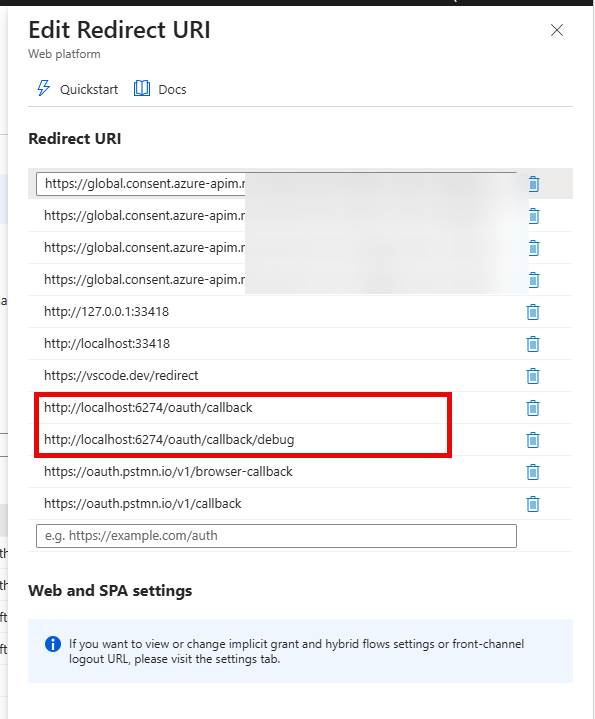
Finally, we need to configure the redirect URLS for the Entra ID application so that we can use MCP Inspector to test it out.

Save your configuration.

Setting up your MCP Client Entra ID Application

Next, we will move to configuring the MCP Client.

  • Open the MCP Client that you have created.
  • Click on API permissions
    • Add the permission to the mcp.tools scope from your MCP Server using the API’s my organisation uses
    • Choose the mcp.tools scope
  • Finally, Grant Admin Consent to the application if you have permission.

Finally, we need to set up the MCP Client Entra ID application with some redirect URLs

Fire up and configure the MCP Server

Now that we have the MCP Server and MCP Client Entra ID applications set up. We can switch back to the code and update the configuration to ensure that our MCP Server uses it.

Open the MCP Server Project, i365.Mcp.EchoMCPServer in Visual Studio or Visual Studio Code. I am using Visual Studio.

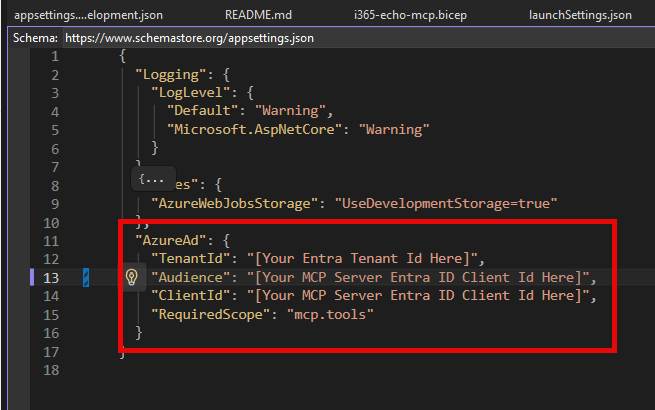
  • Open applicationsettings.development.json
  • Update the AzureAd section with the following configuration
  • TenantId: [Your local Microsoft Entra ID tenant ID]
  • Audience: [the Client id for your MCP Server Entra ID Application].
  • ClientId: “[the Client id for your MCP Server Entra ID Application]”.
  • RequiredScope: “mcp.tools”
  • Now you should be able to compile and start the code with this configuration.

Test your MCP Server with MCP Inspector

With your MCP Server up and running, let’s connect MCP Inspector to it.

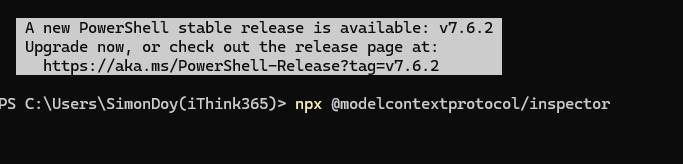
  • Fire up a terminal / PowerShell whatever you would like, and run
  • “npx @modelcontextprotocol/inspector”

After a minute or so, you’ll see MCP Inspector appear.

Make sure you access the MCP Inspector from a browser that is running against the tenant that contains the two MCP Server and MCP Client Entra ID applications that we have created; otherwise, you will see errors about the application not existing in tenant xxxx.

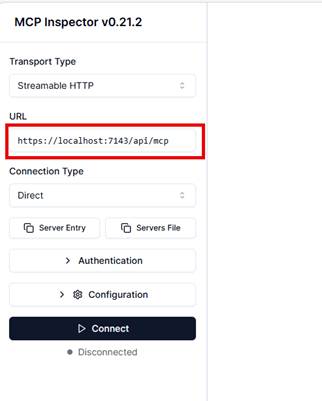
Update the MCP Inspector to point to your MCP Server running locally,

Use the URL: https://localhost:7143/api/mcp

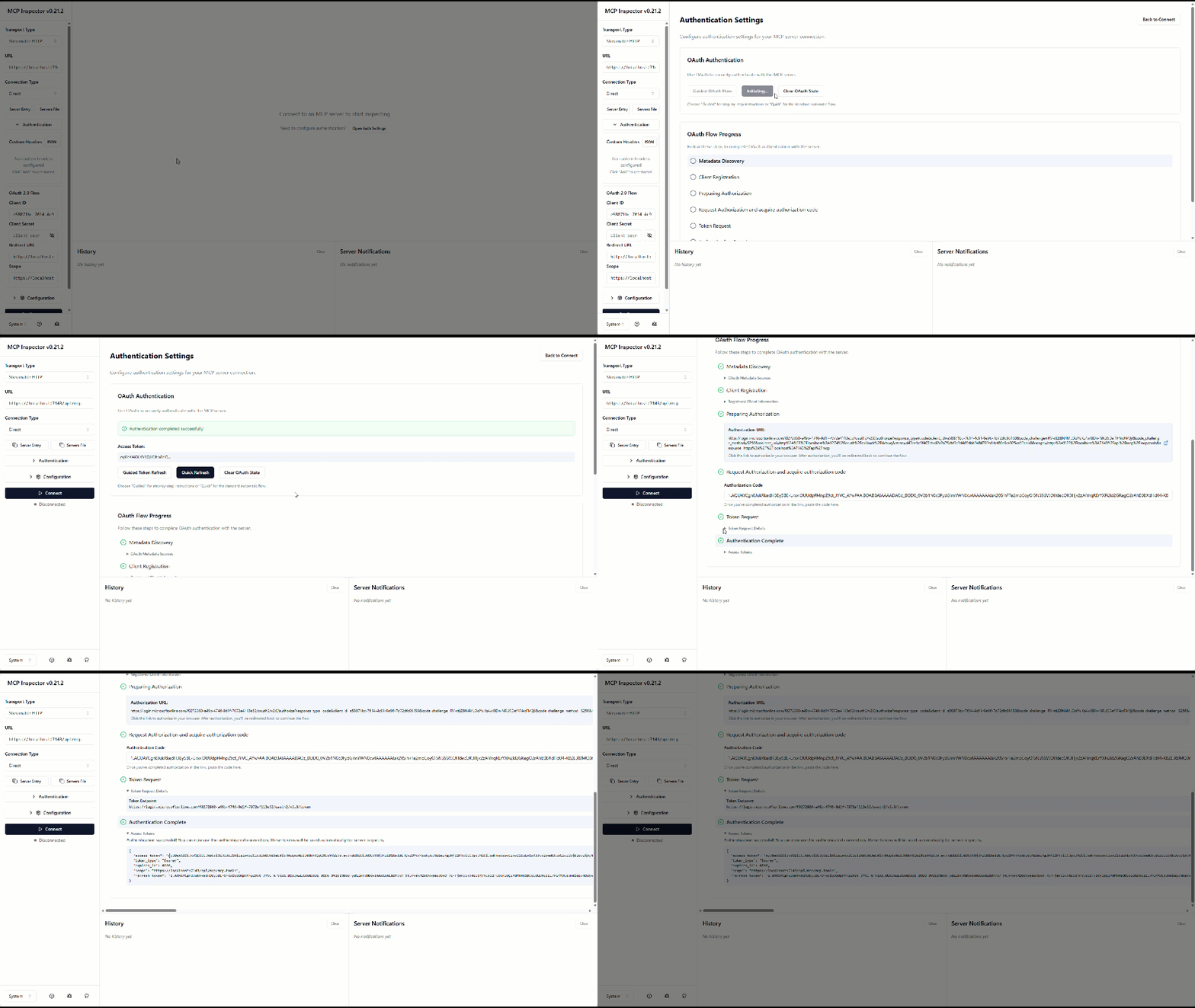
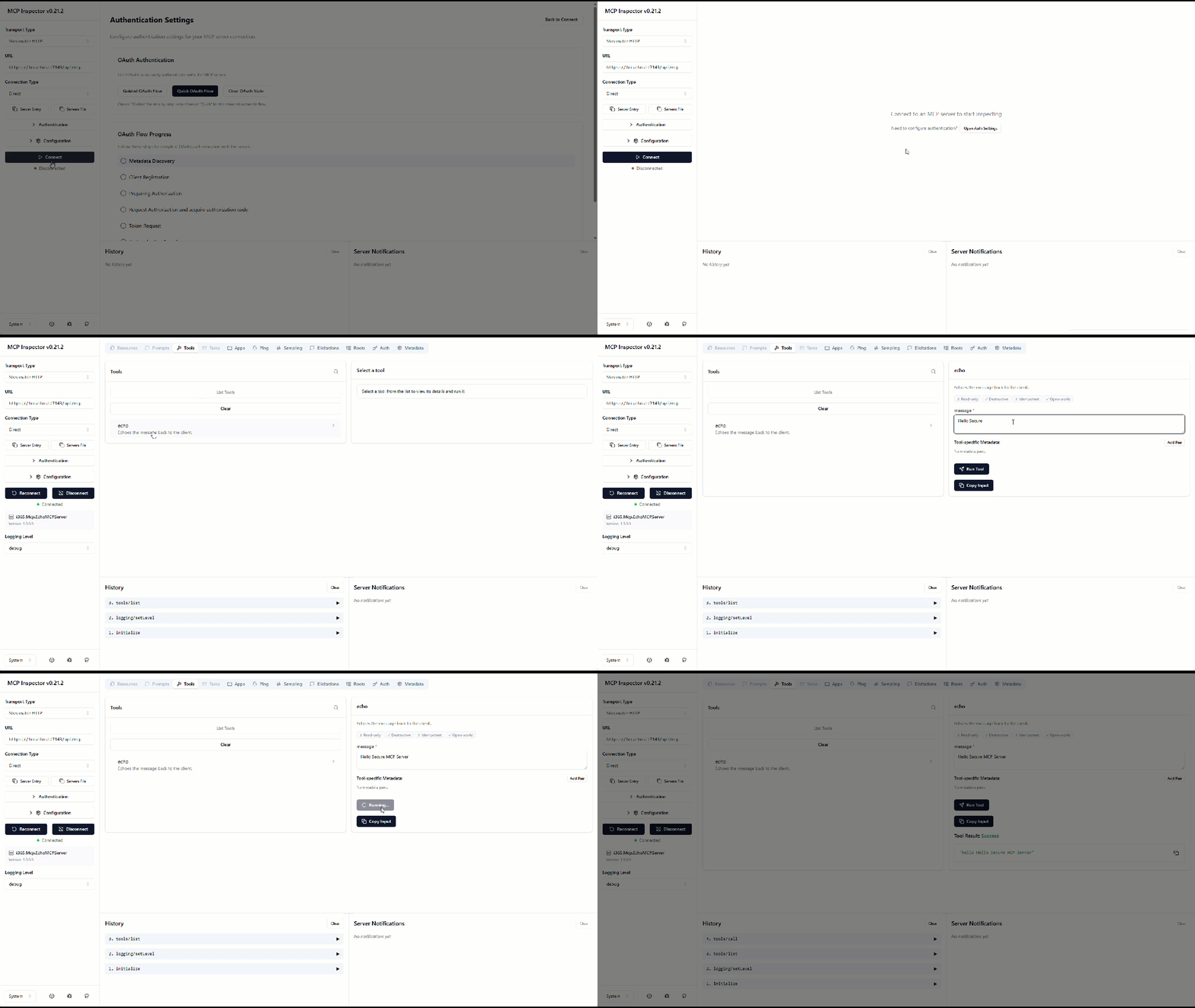
An animated gif showing the process of authenticating MCP Inspector to the Entra ID Backed MCP Server.
The result is an access token which can be used to authenticate with the MCP Serve.r

Testing the Authentication Process

Make sure your MCP Server is running on https with port 7143.

  • Click on “Open Auth Settings”
  • Click on “Quick OAuth Flow”
  • You should now see MCP Inspector go through the OAuth Flow Process, discover the metadata required to connect to our Authorisation server, etc.
  • You will then be asked to sign in
  • Once you sign in, you should see an access token created, and you should be ready to connect.

Connecting to the MCP Server

We are now ready to connect to the MCP server.

Click on the Connect button.

You might need to authenticate again, but you should see the tools appear that are hosted within the MCP Server.

This animated gif shows how the user can now connect to the secure MCP Server and list all the tools. The user accesses the echo tool and say Hello MCP Server. The MCP Server responds back with Hello, Hello MCP Server.

That’s it, you are up and running.

What Next?

Well, now that you have your base MCP Server, you need to get it deployed into Azure, and you will need to start adding tools to your MCP Server.

You can find out the process to get it deployed into Azure using Azure DevOps in this article.

How to: Build a Custom MCP Server with the .NET MCP SDK, host as an Azure Container and connect to Copilot Studio | Doy’s Microsoft 365 and Azure Dev Blog

So, how does this all work, and why did you do it the way you did?

So, getting this up and running took me a while as I was trying to reverse engineer what was going on. I looked at loads of examples, and there does seem to be some issues with MCP Servers and Entra ID when you’re trying to get dynamic client registration, etc., working.

However, let’s talk through the code a bit. Firstly, the .NET MCP SDK was used to build this MCP Server, and it does have support for discovering protected metadata resources, but I could not quite get it to produce the endpoint result that I was looking for. I used Microsoft’s Dataverse MCP Server to try to understand how it all fits together.

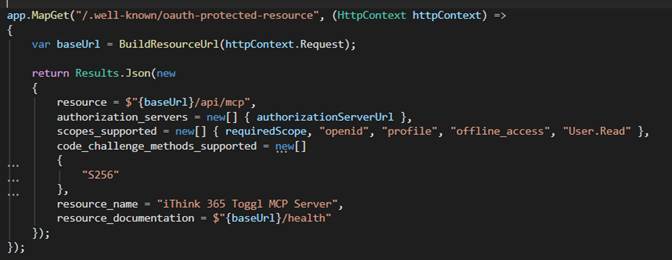
The discovery of authentication settings is provided in the code by this section, which creates a well-known endpoint, “/.well-known/oauth-protected-resource”.

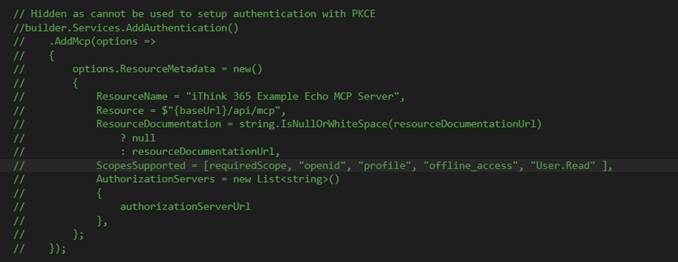
Now you should be able to use the .NET MCP SDK to create this as well, except I was trying to copy the Dataverse MCP Server, which provides the code_challenge_methods_supported parameter as shown above. However, when you use the MCP SDK, it does not allow you to configure this and all you can configure is Bearer header configuration.

Figure 1 – This is from the .NET MCP SDK, and I could not get the dynamic discovery stuff to work with this.

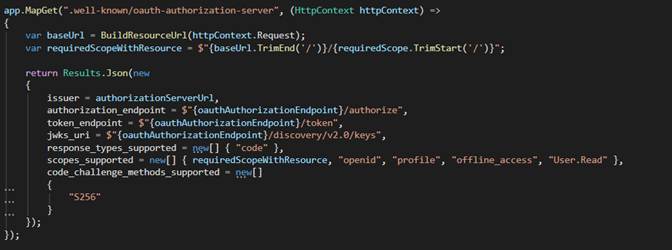
Also, another part of the puzzle for the dynamic setup was having a .wellknown/oauth-authorization-server endpoint, which is used by the MCP Client to complete all the authentication. You can see the code here

The other things that we have configured is stateless MCP switched to true. I have seen this cause issues with Copilot Studio MCP Clients, however, I really need to work through building a stateful example soon.

The authentication being backed by the mcp.tools scope is again the same pattern that I have seen Microsoft use and so I have copied that. The code that enforces the Authentication Policy to enable access for mcp.tools is shown below.

Anyway, I think this blog post, along with my original one about building MCP Servers for Copilot Studio, should give you plenty of support in understanding the code. But please ask if I have missed out on something that you would like to be included.

Conclusion

So, in this post, we discussed setting up a secured Entra ID MCP Server using a template and making it so that you can test it from MCP Inspector using Entra ID OAuth authentication.

Thanks for reading. My next blog post is to take this template and make it available to Microsoft 365 Copilot Cowork through the new plugin infrastructure. I have a working version, just need to get writing, so watch this space!