Like all good SharePoint developers we have been using Sandbox Solutions where we can. Of course one of the problems with Sandbox solutions is that its difficult to find out what you have installed and where.
This is particularly important if you have a Sandbox solution that is used for branding and is installed into a number of site collections.
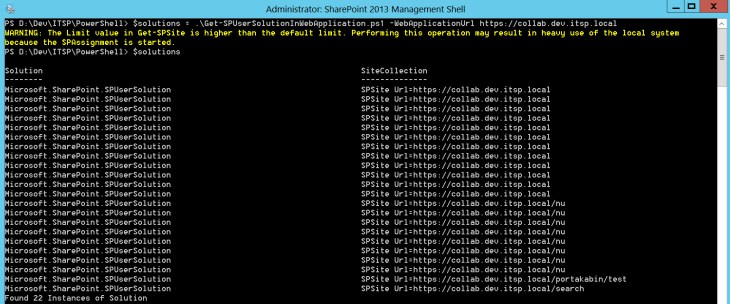
Therefore I built a script which will retrieve sandbox solutions in a web application.
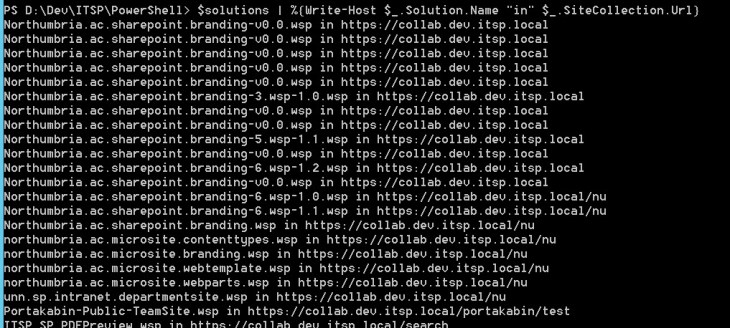
You can filter which sandbox solutions by the name.
Please fill free to use and modify the script, though make sure you test it before using in Production.
If you do make some enhancement that you think is useful, please let me know as would love to see what additional functionality is useful.
How does the script works
The script is a PowerShell script which works in the following way:
The script is run by providing the Url for the Web Application
The script will enumerate through all the site collections in the web application and creates an array object which has two properties, SiteCollection and Solution
Once all site collections have been enumerated then the array will be outputted.
This way you can use the output for further processing steps. For example, to filter the results for one solution and upgrade the solutions in all the site collections returned.
Microsoft have been busy releasing the next reason that your AI bills are going to increase: Persistent Agents. These agents are part of the Agent 365 ecosystem with their own personal identity, mailbox, user account and tools.
Unlike existing Copilot Studio agents which are often initiated and tied to a user, these are an extension to the Autopilot concept and allow you to have AI Team mates.
The AI Teammates are hosted on the Github Copilot Harness, so they are billed through usage-based billing UBB and because of their nature, they are going to be harder to control because they are accessible through Microsoft Teams and Outlook, via chat and email respectively and also Microsoft Office via the Word, Excel and PowerPoint comments feature.
So, what does this mean?
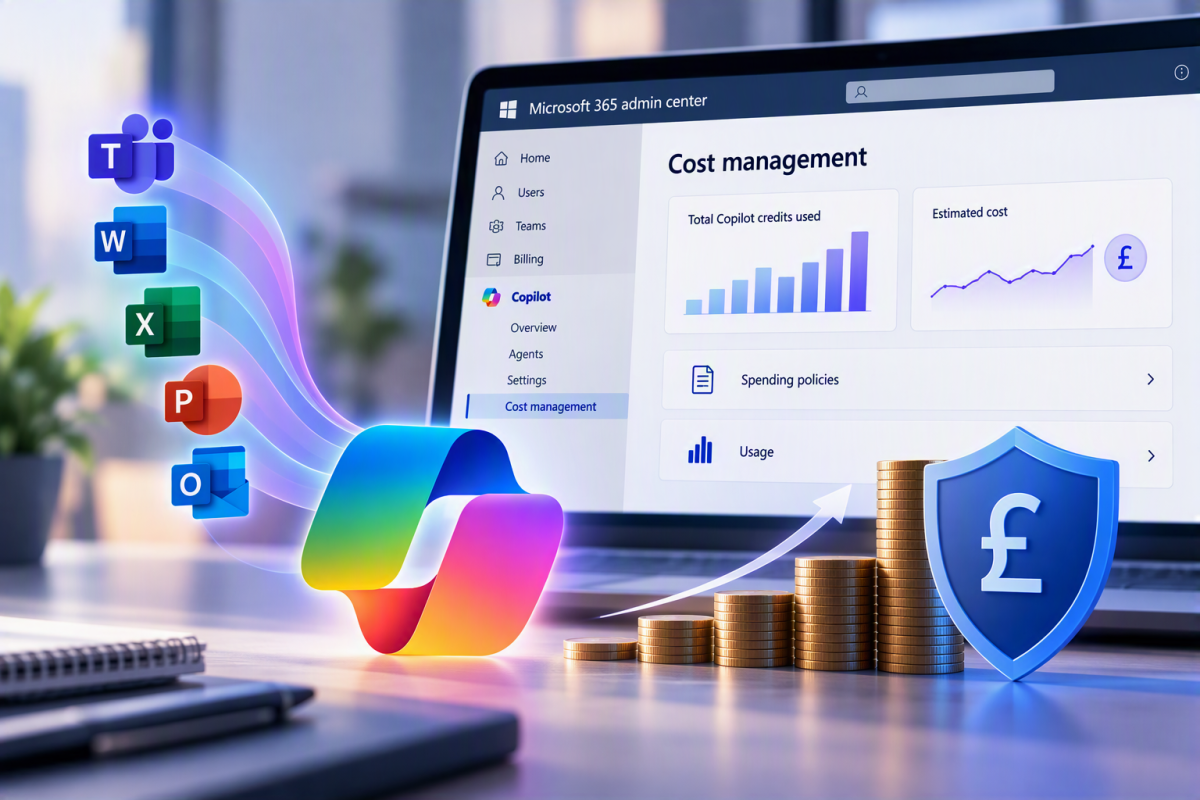
Well, it is further proof of the need to get serious with your AI FinOps spend. So let’s discuss the process of setting up the Cost Management features for Microsoft 365 Copilot.
Microsoft, have also been busy. They have added more features, giving you more control in how you can configure these billing profiles and spending policies.
However, the clock is ticking when Microsoft released these usage based billing features they were switched off by default. This is due to change, from 1st December 2026 a default spending policy will be set-up for CSP purchased Microsoft Copilot Business licenses.
More information can be found here.
October 2026 announcements – Partner Center announcements | Microsoft Learn.
Here you can set up a general policy which covers everyone in the business who has access to use these tools. My recommendation is that you work with your CFO to define a monthly spend and then allocate it to all your users. The pricing is based on 0.01p per Copilot Credit, so 1000 credits is £10.00, and 10000 Copilot Credits is £100.
The first step, as mentioned, is to plan out what budgets and policies you are going to apply to the organisation. In my experience, you will have at least two spending policies but most likely more based on the usage/value scenarios.
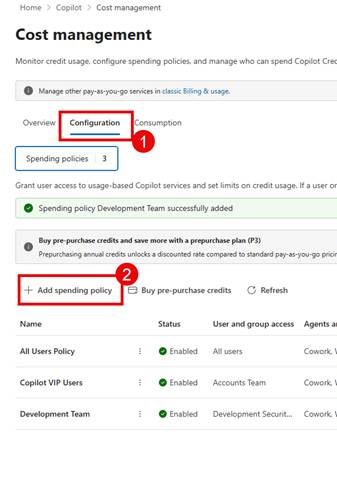
Click on the Configuration Tab under Copilot->Cost Management
Click Add Spending Policy
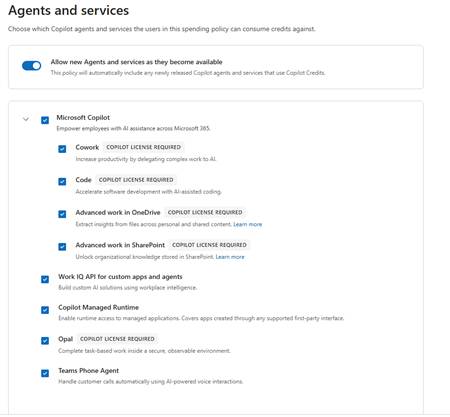
Here you can choose the services that will be applied to this spending policy. I think the interesting one is the option at the top, “Allow new Agents and services as they become available” which shows that Microsoft have more services that will use this way of billing and here you can choose whether to automatically enable those. I suggest that you switch this off if you want to have control of the onboarding of services.
We have the following services, expanding Microsoft Copilot allows us to choose the sub-Copilot experiences.
I am glad that they are giving us a way to turn off the services at this level and being able to control who can create Managed Apps with Code vs who can execute those Managed Apps through the “Copilot Managed Runtime”.
A quick summary of the services is shown below
Service
Description
Copilot Cowork
A task-based Copilot experience for carrying out advanced, multi-step work on a user’s behalf; it requires a Microsoft 365 Copilot licence and consumes Copilot Credits for eligible usage.
Copilot Code
A software-development experience that uses the GitHub Copilot coding harness to help create and complete coding work. Eligible usage requires a Microsoft 365 Copilot licence and is governed through Copilot Credits and the organisation’s spending policy.
Advanced work in SharePoint
Provides advanced AI-assisted work over SharePoint content, helping licensed Copilot users analyse and act on organisational information while its usage is governed through Copilot Credits.
Advanced work in OneDrive
Provides advanced AI-assisted work with files stored in OneDrive, enabling licensed Copilot users to analyse and work with their content while usage is charged through Copilot Credits.
Work IQ API for custom apps and agents
Allows custom applications and agents to use Microsoft 365 work context and organisational knowledge through Work IQ, with API consumption metered separately in Copilot Credits.
Copilot Managed Runtime
A governed hosting and execution environment for internal line-of-business applications, providing Microsoft Entra authentication, connectors, policy enforcement, central inventory and usage monitoring; running eligible apps can consume Copilot Credits.
Teams Phone Agent
An AI agent capability for Teams Phone scenarios that supports automated handling of calling-related work, with eligible usage managed through Microsoft 365 Copilot spending policies and Copilot Credits.
Click Next once you have selected the services you wish to include in the spending policy.
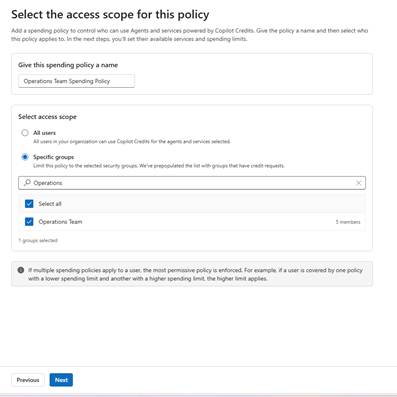
Now you need to give the spending policy a name.
Select whether access scope should apply to everyone or a group of people. If you select specific group you can choose either Microsoft 365 Groups or Security Groups.
Choose your group if you are going down that route.
Click Next
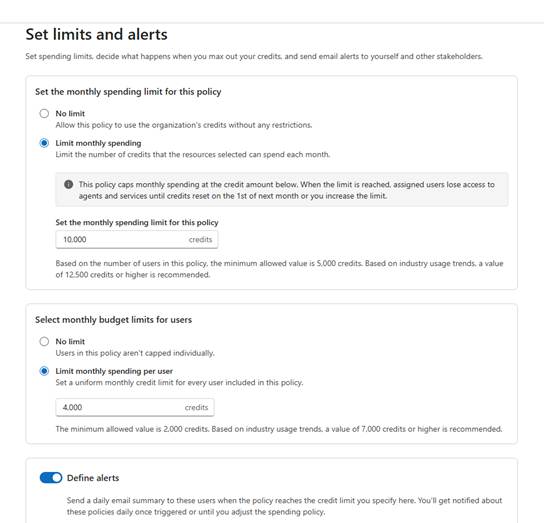
Now you are ready to setup the spending policy limits.
Choose whether to have no limit or apply a monthly limit, I would advise the later.
Additionally, we can choose to limit individual users within a plan. If you want to ensure that a particular user does not consume all of the credits then you can add an individual limit. I would suggest doing this in the first instance. If you have a suer that is getting more value from AI then most you can always move them into their own spending policy and manage them individually or group them with other Copilot VIPs!
Finally, we can define alerts, the user interface will change depending on what options you have enabled.
You can provide a list of users and then choose the limit as to when people should be notified this can either be based on % consumption or individual credit consumption. Additionally you can be alerted when a user reaches a % of their capacity as well.
Once setup click Next
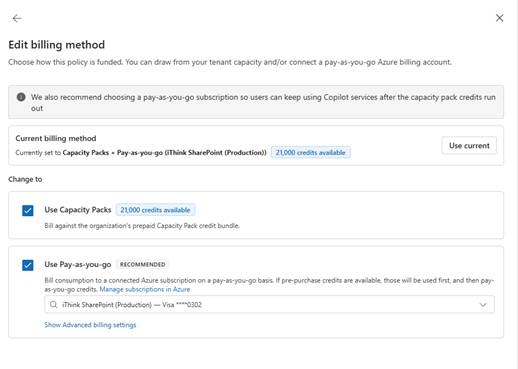
Finally choose how you are going to pay, you can choose to include this spending policy in any pre-purchased payment packs as well as llnk it to your Azure Subscription. You will need to have access to the Azure Subscription to be able to link them to the Spending Policy.
Click Next
Review your spending policy settings
Click Create Spending Policy.
You can always go back and edit the spending policy if you wish by choosing the spending policy and clicking Details.
Once we have set up our spending policies then we will need to review who is using what every once in a while.
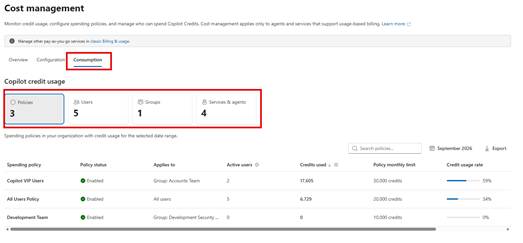
Clicking the Consumption tab will reveal the different views where we can review at a policy, user, group or service level.
It is worth highlighting that depending on the view you can change the data that is being viewed. For example at the policy level the top-right filter allows you to view by month, current month and the entire year.
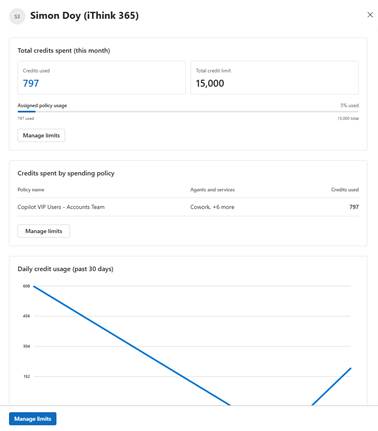
If you choose the user level, you can also drill into an individual’s consumption level. You can see which spending policy has been applied to them if they are in multiple policies and how their daily usage is working out.
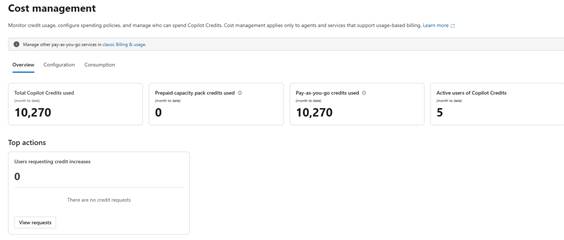
If you want to look into the usage in more detail then there are more options on the overview page.
So, you might be looking at these screens and instructions and say that looks great Simon but what about controlling my Copilot Agents and Copilot Credit consumption.
Unfortunately the controls to Copilot Agent Copilot Credit consumption is not found here which is a bit of a shame but I suspect that is down to keeping those controls under the Power Platform Admin team rather than confusing things within the Microsoft 365 Admin centre.
If you have Premium licenses you will have Copilot Credits available which can be allocated to environments or alternatively you can allow an environment to pull the Copilot Credits from the tenant wide available credits.
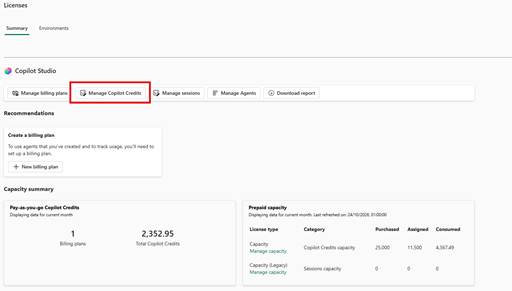
To control this use the “Manage Copilot Credits” button.
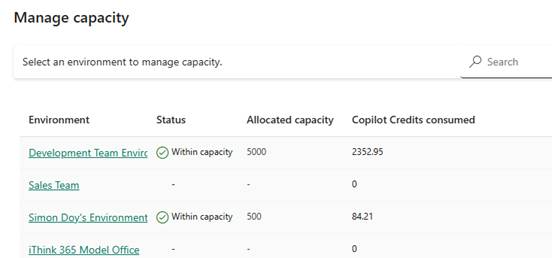
From this view we can see a list of Power Platform environments with columsn for current Copilot Credit Consumption and Allocated capacity. Additionally, you can see if there are any environments which are not within the allocated capacity.
To update the available Copilot Credit capacity
Click on the environment name
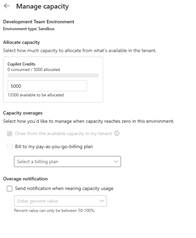
From here you can control the following
How many credits are available to the environment.
Whether the environment can draw from tenant capacity. My screenshot shows it greyed out because it is managed via a managed environment group policy.
Choose whether to have PAYG enabled as well, I have this switched off for development environments. However, I would suggest enabling this for Production with alerts so that you can ensure that your agents continue to work if they go over Copilot Credit capacity.
Finally, you can set up alerts.
Please ensure you have allocated some credits to cover your consumption otherwise your Copilot Studio agents will be impacted.
Click Save to complete your setup.
A note on the option “Draw from the available capacity in my tenant.”, I had an issue where this was disabled and I could not set it through the Managed Environment wide setting. I ended up having to switch the option off and back on again at the Managed Environment level to get this option to update. Until I did that, I could not configure Copilot Credit allocation as I kept getting an error.
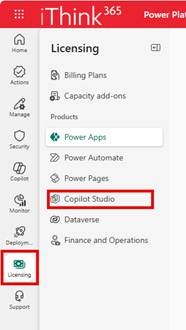
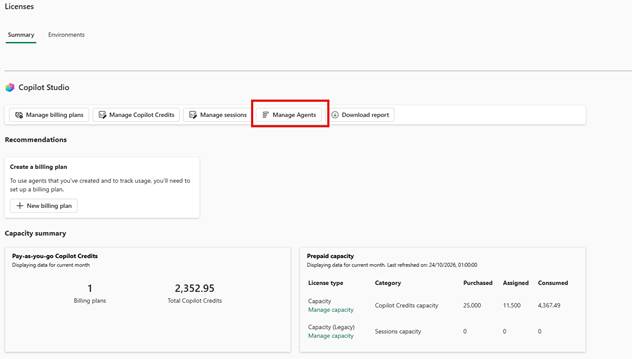
The monitoring of Copilot Credit consumption is possible through the Manage Agents button within the Licensing -> Copilot Studio menu.
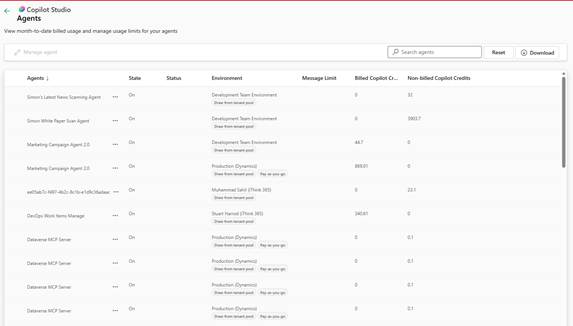
We can now see each of the agents across the Power Platform environments.
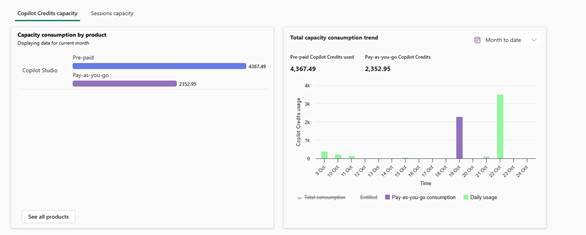
Here we can see consumption of Copilot Credits which have been billed through a spending policy and those that have used pre-paid credits.
If you wish to get more detailed information, click “Download Report” you can choose the number of days history in your report to get more detailed information.
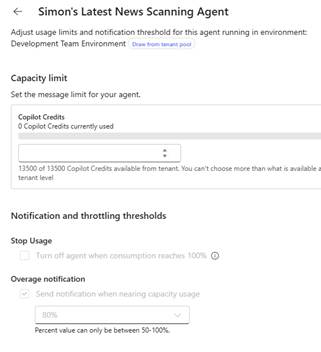
Limiting an individual agents consumption
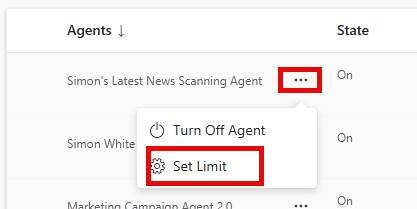
We can also limit an individuals agent Copilot Credit consumption within this screen by clicking the … next to the agent and choosing “Set Limit”.
From here we can allocate a capacity limit for an individual agent.
This is a really useful feature to put some controls around your individual agents!
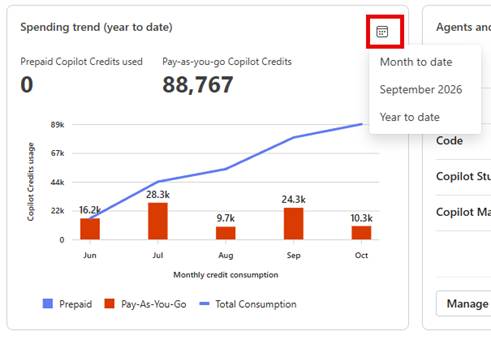
There are a number of different reports and charts which are worth exploring which allow you to see who is using the agents and what their consumption is either at the pre-paid billing of pay as you go billing level.
Additionally, we can see which agents are consuming the most credits which is useful to help us get an idea of what typical credit usage might be for a year.
In this article we showed you some of the features that we can put in place to manage AI consumption, billing and FinOps around Microsoft Copilot and the various billing controls.
There is more coming to this area from Microsoft, in particular expect some more announcements at Ignite 2026.
One of the things that writing these articles helps to do is solidify and find those sometimes hidden options. I had not seen the individual agent credit control before which has been a great find.
I would love to hear your thoughts and what controls you would like to see which are missing.
This article has been written with the aid of Microsoft Copilot.
Over the last couple of years, we’ve been spending a lot of time building agents.
Some are simple. Some are quite sophisticated. Some are internal experiments and some are helping solve real business problems. Like many people working in this space, I’m trying to understand where AI is heading and, more importantly, what organisations need to be thinking about today.
One thing has started to become apparent.
Microsoft are moving from a world of fixed AI licensing to a world of AI consumption.
This is a big change; I think it could become one of the biggest changes organisations need to prepare for over the next few months.
And it has got me thinking more about the rise of AI FinOps and what we can do to help our customers.
We’ve Seen This Before
When cloud computing first became mainstream, many organisations struggled to adapt.
Traditionally, IT was relatively predictable. You bought servers. You bought software. You purchased licences. The costs were generally known upfront.
Cloud services changed this completely. Suddenly, organisations were paying for what they consumed: storage, compute, network traffic and databases.
The technology teams loved the flexibility. Finance teams sometimes had a different perspective when the invoices arrived.
This is where FinOps emerged.
FinOps helped organisations understand what they were consuming, why they were consuming it and whether they were getting value for the money that was being spent.
The goal was never simply to reduce costs. The goal was to maximise value.
I can’t help thinking that AI is about to follow a very similar path.
Why Copilot Changes the Conversation
Historically, most Microsoft 365 discussions have centred around user licensing.
How many users do we need? Who should get a licence? Have we assigned the licences correctly?
These are all sensible questions.
However, AI introduces another layer.
As Microsoft continues to expand the capabilities of Copilot, Copilot Studio, AI-powered development tools and agent experiences, we’re increasingly seeing consumption-based models emerge through Copilot Credits.
That changes the conversation.
The question is no longer simply: How many Copilot licences do we own?
It starts becoming: How much AI are we consuming and what value are we getting from it?
Those are very different questions.
What Is AI FinOps?
I suspect AI FinOps will eventually become a specialised extension of traditional FinOps.
Not because AI is completely different, but because the things we need to measure are different.
Instead of virtual machines and storage accounts, organisations may find themselves tracking things such as:
Agent execution
AI reasoning
Copilot Credit consumption
AI-powered processes
Usage patterns
Business outcomes
Value generated by AI workloads
Ultimately, the challenge remains the same.
How do we ensure we’re getting value from the resources we’re consuming?
The Challenge With Agents
One thing I’ve noticed whilst building agents is that we often focus on capability first.
Can the agent do the job? Can it solve the problem? Can it complete the user’s request?
Those are absolutely the right questions when you’re learning and experimenting.
However, once agents move from experimentation into production, another question starts becoming important.
Can the agent solve the problem efficiently?
For example, imagine a user asks an agent to build a solution.
A very capable agent might analyse requirements, design a data model, build an application, create workflows, produce documentation, generate reports and configure automation.
On the surface, this sounds fantastic.
However, what has happened behind the scenes? How many reasoning cycles did it perform? How many searches did it execute? How many tools did it invoke? Did it arrive at the answer directly or explore five different approaches before choosing one?
The user may only see the final result. The organisation may eventually care about the journey taken to get there.
Why Agent Optimisation Matters
This is where things start to get interesting, **well interesting to me**.
Historically, optimisation has been difficult.
A lot of the intelligence in an agent was buried inside prompts and instructions. As agents became more sophisticated, prompts became longer, instructions became more detailed, and workflows became more complex.
One of the challenges was simply giving the AI enough context to make good decisions.
What I’m starting to see from recent updates is a move towards architectures that make optimisation easier.
The latest developments in agents, orchestration and harness capabilities are creating opportunities to shape how agents reason and how they execute tasks.
That might not sound particularly exciting. But from an AI FinOps perspective, it could be hugely important.
A good optimisation strategy isn’t necessarily about using less AI. It’s about using AI more effectively.
An Interesting Example: Work IQ
One capability that I think will become incredibly important is Work IQ. This is Microsoft’s intelligence layer for accessing your work context.
Traditionally, AI spends a lot of effort trying to understand context.
Who should I talk to? What project is this related to? Where is the information? Which document is relevant? Which team owns this?
That investigative work has a cost.
The more effort required to find context, the more effort the AI has to expend before it can begin solving the actual problem.
What I find interesting about Work IQ is that it helps the AI understand the organisational environment more effectively.
If the AI can find the right people, projects, conversations and information more quickly, in a more succinct way, then it will need less effort to reach the correct answer.
Better context means less work.
Less work means lower consumption.
Lower consumption means better results and value.
I suspect this is one of those areas we’ll be talking far more about over the next few months.
From Adoption to Optimisation
A lot of organisations today are still focused on adoption.
How do we build agents? How do we deploy Copilot? How do we train our users? How do we identify use cases?
Those are still the right questions.
However, with the changes to usage-based pricing, the conversation quickly moves to cost optimisation.
We are already seeing this in practice. A couple of organisations have started building agents with the assumption that the activity would effectively be covered, only to discover that costs can appear unexpectedly or be higher than they had imagined.
Cost estimation is hard at the best of times, and Microsoft’s recent move towards more usage-based pricing through Copilot Credits makes this more likely and, unfortunately, somewhat inevitable. The lesson is not to stop building agents, but to treat cost modelling, monitoring and optimisation as part of the adoption journey from the outset.
How do we govern AI consumption? How do we measure value? How do we optimise agent execution? How do we manage Copilot Credits? How do we scale AI responsibly?
I think that shift is coming sooner than many people realise.
Where Do We Start?
My advice now is simple.
Don’t wait for AI FinOps to become a formally recognised discipline before thinking about it.
Start building agents. Start experimenting. Start learning. Understand what works. Understand what doesn’t. Measure outcomes. Pay attention to consumption patterns.
And most importantly, focus on business value rather than technical activity.
However, put in place a budget, what is a reasonable monthly cost?
Make sure you are adding controls around that budget so that you don’t have unexpected costs appearing and have controls in place so that do not become a surprise.
We have a budget at iThink 365, who are a 9-person organisation of around about £250 per user per month with some variance based on the user role.
Microsoft have started putting cost management controls in place, but they need to be better with more granular controls for specific products and instances of those products. For example, being able to allocate a budget for a specific Agent or product within Microsoft 365.
Ultimately, organisations won’t be successful because they run the most agents. They’ll be successful because they generate the most value from those agents.
And that’s why I suspect AI FinOps is going to become a very important conversation over the next few months.
At iThink 365, we’re already having these discussions with customers through our improvement packages and soon via our Agent Adoption Service.
Today, the focus is helping organisations to get started with agents. Tomorrow, I think it will increasingly be about helping them optimise, govern and scale them successfully.
It is going to be fascinating to watch how this space evolves.


 .
.