

Introduction
So I’ve been using Copilot Agents more and more everyday, whether that is personal or in my worklife to help with my personal workflow.
I have been spending time looking at how I can embed AI into my daily routines.
In particular, I have been looking at how I can use agents to make me more productive and efficient. One area that I spend a lot of time on is keeping up to date with what’s going on in the world. This has been something that I’ve been using agents to do, horizon scanning!
So, horizon scanning is the process of looking into trends. What’s going on with the latest news for me that is the latest general news, business news, tech news, but also using it as well to help me keep up to date with AI and technology. Of course, I am constantly trying to keep up to date with Microsoft 365. Also, I want to keep an eye on white papers and research from various outlets such as Google, Microsoft, Open AI, Gartner, Mckinsey, etc.
Since GPT-5 has been launched and has more capabilities in terms of research and reasoning, I’ve really been spending more time trying to use these models with these agents as I get better results.
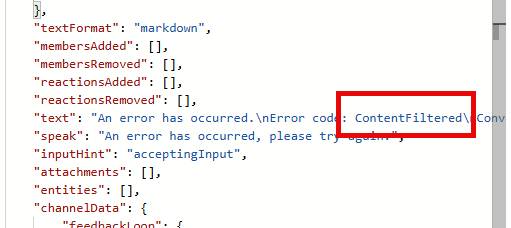
Now, one of the challenges recently has been that when I build these agents using Copilot Studio, I am looking to get content sent to me in the morning. Copilot Studio has triggers which can be executed for all sorts of reasons, and I have been using the daily scheduling trigger, which fires off every morning. This workflow calls a Copilot Agent and gets a result. Unfortunately, I have been getting errors when those agents run. These errors are Content Filtered errors or exceptions, and they come about when Microsoft’s Responsibility AI detects an issue and kicks in because it thinks there is an attack occurring against the AI.
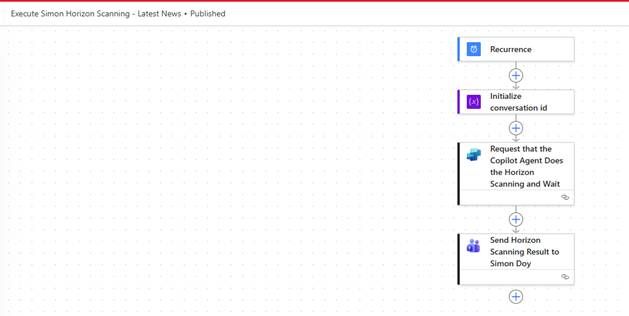
Here is an overview of the Agent Flow
Being an MVP, I am fortunate to be able to get access to the Copilot Studio Product Team. So I reached out and explained the issue I was seeing. They reviewed one of my agents, and they said that’s an issue in the way that I’m asking the Copilot Agent to execute the agent. From the Responsibility AI perspective, it looks like an attack on the system. The reason is that the prompt being run is trying to manipulate the output, and so it looks like I am trying to manipulate the AI to do something it wasn’t instructed to do. Therefore, it’s being picked up as an attack, and so, you know, I need to not do that.
So, this got me thinking. I need to rethink how I architect these agents. Copilot Studio, as you are probably aware, have the concept of topics. Topics allow you to have an agent which can support multiple capabilities within one agent. For each topic, you configure the topic by describing how the topic should be detected and used. This is used by Copilot Studio’s orchestration engine to understand which topic to trigger.
This allows the building of an agent that supports multiple capabilities, each with their individual workflows or sub-processes.
In my example, I had an agent that had two topics. One topic for getting the latest news, and another topic for researching the latest research and white papers. These topics were being executed by an internal trigger which executes an Agent Flow. The Agent Flow calls the Copilot Agent with a prompt that states whether it’s the latest news or the latest research that I want. It was this that was triggering the ContentFiltered Error and meant that I was not getting any information back.
So this has got me re-thinking my approach and now I have changed the Agent so that it is now two Agents, one for getting the latest news and the other Agent gets the latest research.
All the details of what the agent should do are in the Agent instructions, and I simply call the Copilot Agent with the prompt, “Please execute your instructions”, and away it goes.
Now, since these changes have been made, the Agents have been working reliably for the past few days.
Conclusion
So, when you are thinking about the architecture of your agents, think about how they are going to be executed. Look at having multiple agents rather than using topics, when you are having external systems or processes calling an agent from outside rather than directly from the Copilot Studio agent.
So rather than having one agent with say 5 topics, you would have 5 agents, one for each topic. If you wanted to be able to access the agent from one place, then you could look at building a main agent that about the other five agents and each of those agents would represent a topic.
This is where my thinking is going these days when architecting these solutions. There are certain challenges and considerations to think about when building architectures with child agents, so it might be that they are not needed, but it depends on how the users need to interact with your “main” agent..

 Doy's Microsoft 365 and Azure Dev Blog