Introduction
Microsoft launched a major update to the SPFX world on the 28th October: Copilot UX Components.
This capability brings custom user interfaces into Copilot to dramatically improve the usability and experience for users. No longer are we met with a wall of text, now we can have images, pretty interfaces and more.

I have been tinkering with this new capability whilst it’s been in preview, but now that it has been launched as Generally Available (GA), I wanted to build something “proper”.
Here is the announcement, if you missed it.
I will detail this solution in a subsequent post, but I wanted to quickly blog about an issue that I have hit on more than one occasion. Hopefully, you’ll stumble across this post and quickly get your solutions running, as I have hit this more than once, and it always takes me a bit of time to get to the bottom of it.
Now that we use Github Copilot and the likes to build our software we often hit issues where what has been built all looks good, tests well and works locally but then fails when deployed.
I have seen this happen a few times when I have been building Copilot UX Component solutions, and both times it was because of something called Zod. Copilot UX Components use Zod to describe the JSON schema that is used to inject information into the Copilot UX Component via code.
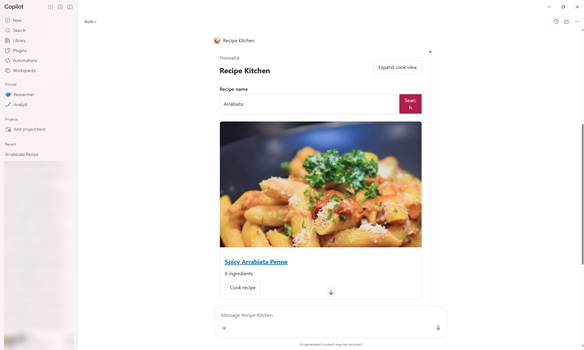
Recently, my latest Copilot UX Component idea was to build a Declarative Agent called Recipe Kitchen. This will help me find recipes to cook for the family. It worked beautifully locally and rendered well in the Copilot Development Workbench.
However, when I uploaded the agent into Microsoft 365 through the Microsoft 365 Admin Centre, it failed and showed the error “Something went wrong. Please try again later.”
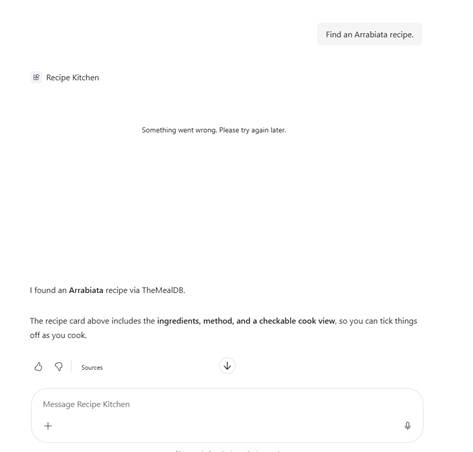
The user interface and agent would display text underneath as expected. However, where, I was expecting the user interface to appear above, it did not. As the text appeared, I knew the agent was working. The issue was the rendering of the user interface.
After a bit of thinking about it, I started to look at the Zod schema. I remember Vesa talking about unsupported Zod parameters, and so I looked through my Zod.
The Zod is configured in your [NameOfComponent]ComponentProperties.ts
I saw two entries in there that made me think, ah I wonder if this is the issue.
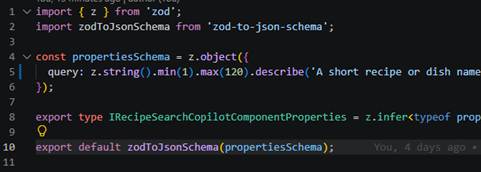
See if you can spot them?
Well, it was the min(1) and max(120) functions. Those made me think, ah, maybe they are the problem. So, before I took them out, I thought I would look through the samples to see if anyone had something similar.
I browsed to the SPFX Copilot Component GitHub repo
pnp/spfx-copilot-components: Copilot UX Components (SPFx) samples
Performed a quick search against the codebase for “z.string()” and reviewed the results. Not one had any reference to min() or max(), so I thought, ah ha and took them out.
I asked GitHub Copilot to up-issue the package and solution version numbers and repack the package. A few moments later, the new version was uploaded and voila! All working!
Now, that’s great, but I need to polish up the look and feel, as some of the ones in the Samples Repo look very smart and mine isn’t quite there yet.