


Introduction
If you are working with an Action Coach Business Coach like Iain Strachan as I am you will be used to the 90-day strategy planning session.
In these 90-day planning sessions, we define 4 Goals which are 3 business goals and one personal goal and build a plan on how to achieve those goals over the next 90 days.
Over the 5 years that I have been working with my coach, I have been trying different approaches to help me stay organised.
The challenges that you might have are:
- How can I be reminded of the tasks that I need to do?
- How can I see all the tasks that I need to complete?
- How can I assign and track tasks that I have delegated to the rest of my team?
- How can I record and track the metrics I have chosen to measure if the goal is complete?
In this post, I will show you some approaches I have been using to tackle these challenges. Plus tips and tricks and the approach that I take with Microsoft 365. Before I do, I need to make you aware that this post will use Microsoft 365 features from a Microsoft 365 Business Standard or Microsoft 365 E3 license and you will need licenses for Microsoft Viva. The Microsoft Viva license that you will need is the Viva Workplace Analytics license.
iThink 365 are specialists with Microsoft 365. We help organisations take a people-centric approach to achieve success with Microsoft 365 to improve their collaboration, communication, business process automation, AI approaches, management information decision making and employee experience.
Let’s get into it.
Planner – The Key to Managing Your Tasks
Firstly, Microsoft Planner is our recommendation to help you work with the tasks and actions in the business. For our scenario, we are going to use it to manage, track and remind us of the tasks that need to be completed for each of your goals.
The Planner application is available via Microsoft Teams, as shown below.
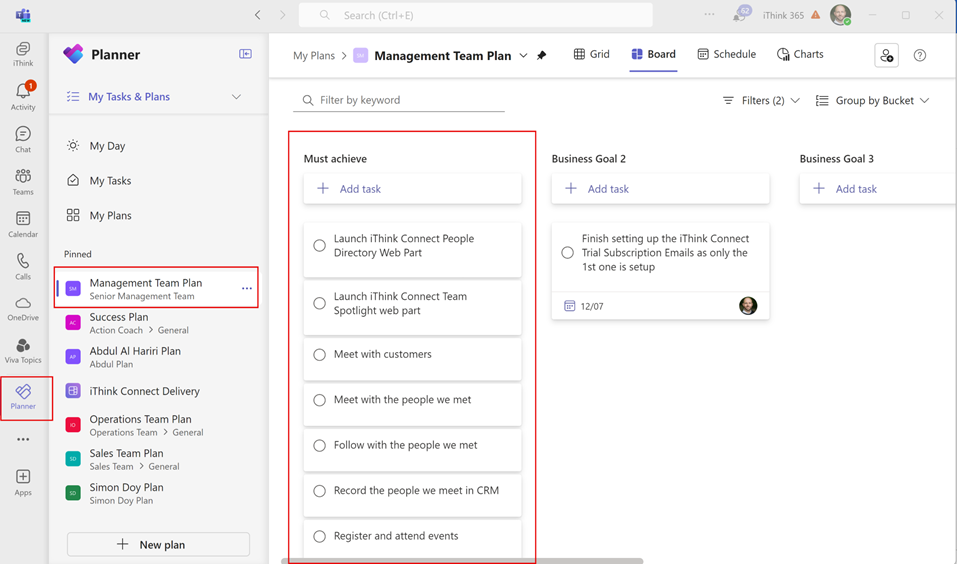
My suggestion is to create a Microsoft Team called Senior Management Team and create your Plan within that team.
You can find the following Microsoft training content to help you create your Microsoft Planner, plan.
With Planner you have a concept called Buckets which are the columns shown below, they allow you to group your tasks together.

We will use buckets to be able to manage our tasks and group them around each of the business and personal goals. Buckets are created for each goal type as shown below.
Next come tasks these are the activities that you have decided on to deliver your goal. Using the plan, these tasks are grouped under the Goal bucket.
Once you have your tasks assigned to the Goal buckets, you are well on track. Using Planner, you will be reminded when you need to do a task. Most importantly these tasks are visible within several Microsoft 365 applications including Microsoft To Do, Planner and Outlook. This will help to keep you pushing to meet your goal, as the tasks that you need to complete will be a consistent reminder.
So, we have a way to track and be reminded of the things we said that we needed to do to meet our goals. But how do we know we have met them?
Well, this is where we need to talk about Viva Goals! But let’s delve into Viva Goals in the next post.
Conclusion
In this post, we started talking about how you can use Microsoft 365 to track, manage and measure your 90-day Strategy Planning work.
Microsoft Planner was introduced as a way to help you manage, track and be reminded of the activities that need to occur.
In the next post, we will delve into how we measure your goals, track the measurement and bring it all together into one dashboard for you to track your progress to deliver your 90-day plan
 Doy's Microsoft 365 and Azure Dev Blog
[…] Manage and deliver your 90-Day Action Coach Success Plan with Microsoft 365 – Part One […]