


Introduction
At iThink 365, we are seeing an increase in the number of project where we are delivering Copilot Agents that are built on Microsoft 365 and Copilot Studio for our customers.
Each time we do one, we learn more and pick up tips and tricks on the way.
In this post, I wanted to share some learnings I have had as we try and do agents which are more agentic and use the orchestration features. I wanted to go through a scenario which I am sure you will have had, and some tips and tricks to help you get some control around.
Copilot Studio is going through a period of rapid change and development. New features are being rolled out each week, and it is constantly changing. Sometimes this leads us to think that something is buggy when in fact it is misunderstanding with how the platform can be configured.
In this blog post, I wanted to share an example of this.
The example is when you use the Question activity to get a response from the user.
One of the behaviours we saw was that the user would choose an option or type a response. On processing of the response, the agent would rather than continue in the same topic, it would switch and execute another topic (https://learn.microsoft.com/en-us/microsoft-copilot-studio/guidance/topics-overview). What the heck, why was it doing that?
Well, it turns out that the Copilot Studio’s Question activity has a plethora of settings. These settings allow you to control the processing logic, so let’s delve into those settings.
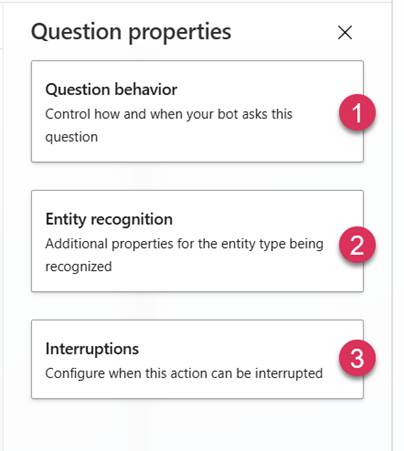
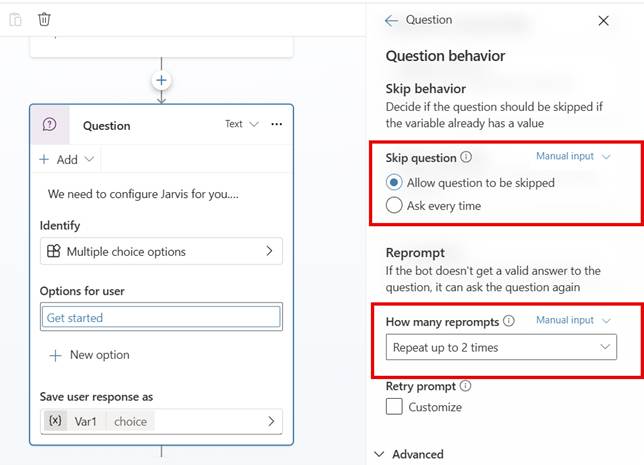
The first set of options is the “Question behaviour”, which controls how the question is processed.
For example:
- Can a user skip this question?
- Does the agent enforce the question, and if so, how many times does it try?
The third option is how the question treats interruptions.
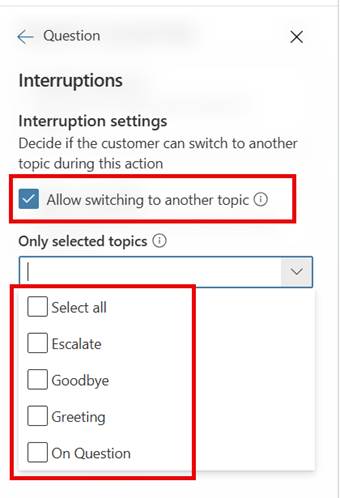
The interruption was the secret to the problem we were seeing, more on that shortly. This set of options allows you to control whether a user can switch to a different topic and, if it can switch, which topic(s) the Agent can switch to.
The reasoning is sound, if you are a user, it may be pretty frustrating to have to go down a particular route and set of questions before you can get the answer you are looking for.
However, as a developer, there will be times when you want to ensure that the user cannot deviate from the process.
So, coming back to our problem, we were seeing that the user’s response was being seen by the Agent as a match for one of the other topics. The user experience was terrible because now they were taken off down a path that was not the expected path, and certainly did not end up with the result and experience that we wanted them to have.
The solution was to uncheck “Allow switching to another topic”, and the issue stopped happening.
Now, what if you did want them to be able to switch to another topic, but you wanted to restrict which topics they can switch to. Well, in order to do that, you can check “Allow switching to another topic” and then select the topics they can switch to.
You may think, how do we ensure that the user experience is what we want it to be. This is only validated via testing with real users. Often we have seen users use language or terms which we were not aware of and then topics are not triggered as expected.
So make sure you test this piece with real users via user acceptance testing before you launch. By doing this, you can ensure the configuration of the question and topics is right. Then the user gets the experience of picking up / switching to the topics with the right content.
Conclusion
I hope you uncover this post in your time of need, and it helps you uncover the plethora of options that the Question activity has.
Please let us know if you have any question or if it helped you using the comments below and thanks for reading.
 Doy's Microsoft 365 and Azure Dev Blog