


Last week, Microsoft Build 2025 announced the introduction of Multi-Agent Copilots within Copilot Studio and the ability to configure one Copilot Agent to make use of other Copilot Agent’s and their tools.
I have been pondering on this for a while, but whilst watching the demos, this got me thinking about how these Agents will be delivered.
It’s clear that there will be a lot of thought required to deliver a solid multi-Agent architecture, which will need to be designed and engineered! There is also no doubt that Generative AI is enabling people to do and achieve more. I am using it daily to help support all my tasks and I especially love how it helps me with coding, through GitHub Copilot.
However, there is a lot of rhetoric out there which talks about the end of developers and how there will be no need for them in the future. Whilst I am sure AI will help developers code better, the thinking and design that Agents will need in the future will require developer principals to get the best from their exciting capability. They will need to be built in a well thought out way to deliver powerful AI Agentic experiences in organisations.
Principals such as the Single Responsibility Principal and Do Not Repeat yourself come immediately to mind. I believe that there will be some low hanging fruit, simple use cases that are relatively easy to implement, as well as more complex scenarios, such as multi-Agents that will require much more thought, architecture and design before they are built. The latter will require traditional solution architecture, developer and enterprise architecture skills. Maybe we will start seeing jobs with job titles such as AI Agent Architect.
I am not going to try and claim that I have established best practices for multi-Agent architecture just yet, but it’s definitely something I’m actively thinking about.
Anyway, let share my thoughts and my current thinking.
Proposed Internal Company Architecture
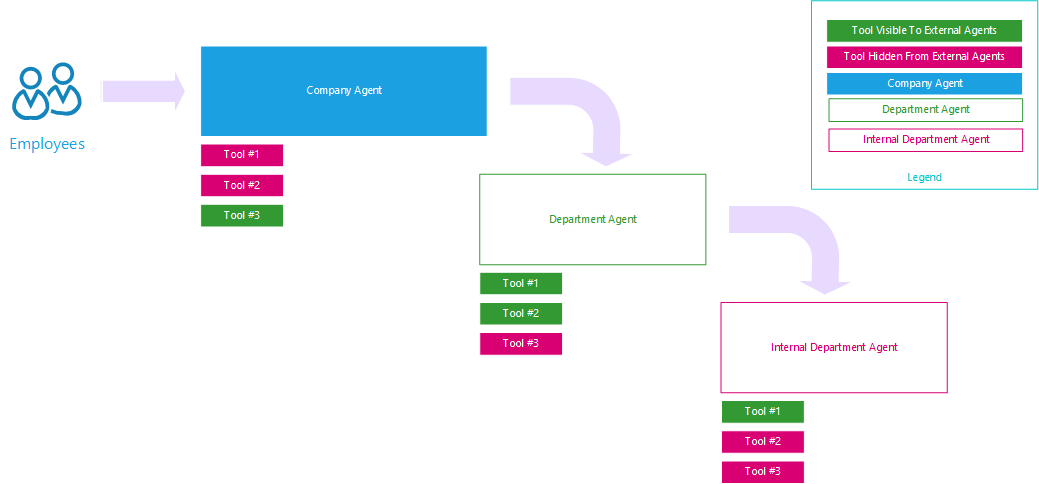
This is a proposed architecture design example for an internal Company agent structure used by Employees within the business.
Agents Following Conway’s Law
Conway’s law states
“Any organization that designs a system (defined broadly) will produce a design whose structure is a copy of the organization’s communication structure.”
I can imagine that Agents will also follow a similar structure. There will be a company Agent which is broken down into department agents. In the same way that we like to structure SharePoint and Teams workspaces, where each department has a public site available to the rest of the business and an internal workspace(s) for their department team. Therefore, there might a public facing department Agent, used by other parts of the business and also by customers. There could also be an internal team Agent(s) that are used by the people within the team.
The department Agent will call into the internal department Agents to start processes and get help and support from the team within the department. Some of that support could also come from the digital Agent or the human Agent.
Microsoft’s thinking is well underway with Agent-to-Agent communication. An example of this is with the announcements of Agents having a first-class identity within Microsoft Entra ID. This means that Agents can be directly identified by Entra.
Also announced were several other features ,such as using Microsoft Entra ID for managing security boundaries for Agents. Here, security groups can be used to control which Agents can talk to one another and presumably who can talk to those Agents also.
All these features are needed to be able to control and architect your multi-Agent landscape within your business.
If you think about all the Agent related protocols that have been announced over the past few months, the landscape is expanding quickly.
For example, we have Model Context Protocol (MCP) and Agent 2 Agent (A2A), which widens the landscape and the need for design and architecture, making it become ever more important.
There are several protocols which are also enabling this Agentic world. A recent announcement ofthe Agentic Network Protocol (ANP), which explores how Agents can discover one another on an open network. Finally, Agent Communication Protocol (ACP) has emerged as a potential competitor to A2A for Agent-to-Agent communication.
Conclusion – Where to Start?
Ultimately, we need to start building Agents and working out which Ones are working well for a business and which ones are not.
I’d be concerned if an organisation tried to design and architect everything up front, as I am sure this will lead to incorrect decisions being made as well as unnecessary designs. Additionally, it is early in the multi-agent communication and protocol space, and this landscape is still emerging and will continue to evolve.
I do, however, suspect that there will be deployment of Agents at the department/team level, and these will be refactoring to expose the tools or capabilities of those Agents outside of the department/team and ultimately outside of the business to customers and suppliers.
We will need to be careful with these Agents as we need to ensure that there are human-in-the-loop principles in place. This will ensure that humans are checking and reviewing outputs just as you would review the work of a team member or validate outputs from any process.
However, to help reduce the amount of rework and technical debt, we should look at building the Agent tools in a way that allows them to be exposed individually to other Agents.
In the short term, I would advise continuing to experiment and gathering feedback. Have a medium-term goal in mind, connecting the most successful experiments into multi-agent solutions.
It is going to be an interesting few years ahead, and I am really looking forward to the transformation journeys within our businesses and excited about what’s to come.
Finally, if you found this useful and are looking to implement Agents into your business, we’d love to have a chat about your plans, share our thoughts, and show you what we’re doing at iThink 365 and with our customers.

 Doy's Microsoft 365 and Azure Dev Blog