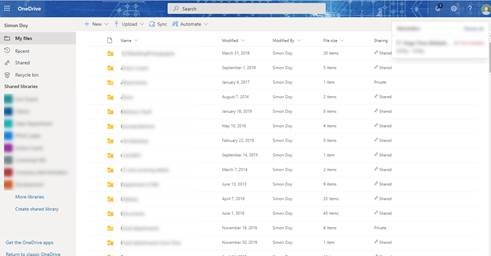
I was chatting with one of our customers last week and they said how annoying it was that they could never find files that people have shared with them. They talked about how they could not remember when it was and searched through their emails, searched through SharePoint but could not remember the file name and so could not find the file.
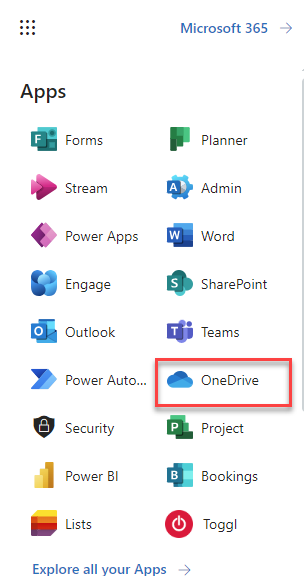
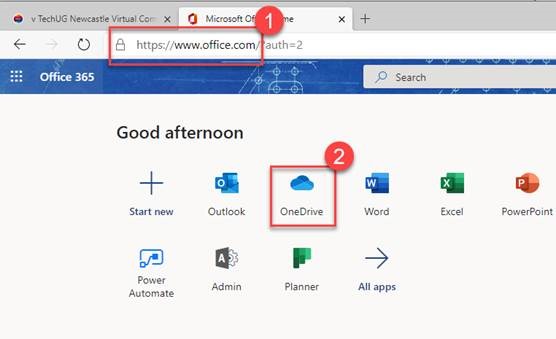
Well, I tell you what when I showed him a little feature in Microsoft Onedrive he was suddenly much happier!
Tip
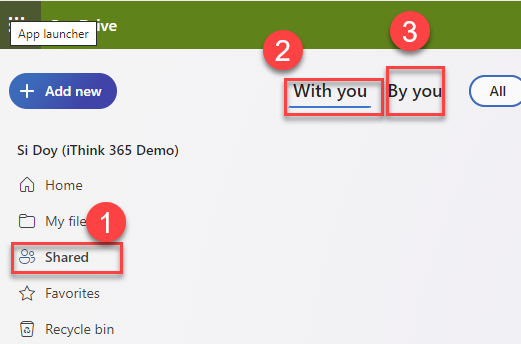
So, if you want to see files that have been shared with you and also files that you have shared with someone then check out this tip.
Several of our customers have expressed that they have had problems when trying to share content from Microsoft 365 with users outside of their organisation.
So that got me thinking that we should write a guide about it.
Microsoft 365 has some great features when it comes to sharing content with people who are outside of your organisation. These people might be customers, suppliers, or other 3rd parties that you need to share information with.
This post represents the first a series of posts which will provide the following information:
Guide users on external sharing with One Drive (this post)
Guide users on sharing with SharePoint Online
Guide users on sharing with Microsoft Teams
Guide for administrators on configuring external sharing.
Traditional Approach
Traditionally email would be the way to achieve this, but it does have some disadvantages:
– The content is out of date as soon as it leaves your outbox.
– The content is duplicated.
– It is being sent via the internet and therefore it is not as secure.
– Large files maybe blocked by the recipient.
A better way
However, there is a better way with Microsoft 365.
The art of sharing content with external users is known as “External Sharing”, it seems like a bit of a black box when you first do it.
A better approach rather than sending the information to an external user, is to invite them to come and get it from you.
Microsoft provide a few options, of course , This can be confusing, and this guide aims to help you with that confusion.
Firstly, before you share the content please ask yourself a few questions:
Will you be sharing a large amount of content with this person?
Are you sharing the same content with a team of people?
If you are sharing a lot of content with this person or sharing with several people, we would recommend using Microsoft Teams. We will talk about sharing from Microsoft Teams in a further blog post.
If you are sharing content with a single person as a one off, then use One Drive to host the content.
With this guide we are going to tackle the problem that you are sharing content with Microsoft One Drive.
Options when sharing content
Firstly, let discuss the process:
It starts with selecting your content
Sending a link to the person who you want to share the content with.
They receive the link.
They have access to the content.
However of course there is a bit more to it.
If you look at the image above there are several options.
The top one “Anyone with the link” allows you to send a link to the content which is Anonymous. The rest of the options send a link which requires authentication.
We are going to call these different types of links
– Anonymous Links
– Authenticated Links
An Anonymous Link is a specially crafted link which allows the holder of the link to be able to access the content without having to login. The link could be shared with other people and those people will also be able to access the content. Therefore, be careful using this approach and only share content that you are comfortable if it goes out into the public domain.
An authenticated link is more sophisticated and requires the user to verify that they are the intended receiver. This makes this approach more secure.
The verified approach is our preferred method because you have more control of who gets access.
Here is a tip, create a folder called External Sharing and move your content into the External Sharing folder. This will help by ensuring you do not share content by accident.
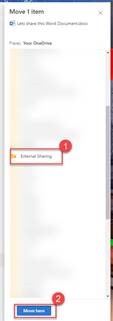
Move content from its current location to the External Sharing folder using the “Move to” command.
The right-hand task pane will appear, select “Your OneDrive”.
Then click “External Sharing” folder.
Finally, click Move here to move the content.
Now we can share the content with confidence that we are not going to share too much.
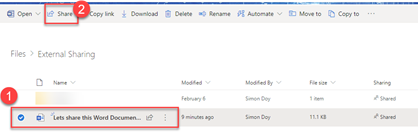
From One-Drive, click “External Sharing” folder to see the content that you wish to share.
Select the content to be shared and then click Share from the command bar.
This will bring up the Send link window.
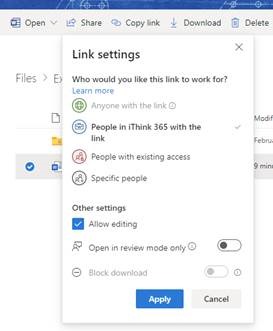
Notice the “People in [Organisation Name] with the link can edit”. This option allows us to choose who the audience who can access this content. Click on the highlighted section and you will see the following options.
Please be aware you may see different options depending on your organisation’s Microsoft 365 settings.
Let us run through the options:
Option
Description
Purpose
Anyone with the link
This will create a weblink and anyone in position of that link will be able to access this piece of content.
This is the easiest way to share content. Use this to share content with people where you do not mind if the content gets into the public domain.
People in [Organisation Name] with the link
This link will allow anyone in your organisation to access the content. Though it will not work for people outside of the organisation.
Use this to easily share content within your company. Do not use this if the content has sensitive information that you do not want certain people to see.
People with existing access
This will create a link but will not change the permissions. Only users with existing permission will have access.
Use this to share content that you know people already have access to.
Specific people
This will create a link that only the specified people
Use this option to define a new set of people to share the content with. A new set of permissions will be applied to the content for the specified people. The users will need to login to access the content.
Keeping it more secure.
Finally, for completeness let’s cover the Other Settings on the dialog.
Option
Description
Purpose
Allow editing
Check this to allow the users to be able to edit and change the content. They will not be able to delete the content.
Open in review mode only
This is a Word Online option which will open Word in the browser into review mode.
Use this when people are reviewing and providing comments and feedback for the document. This is enabled if “Allow editing” is enabled.
Block download
This will stop the user from downloading the content.
The user will need to access this through Word Online via the web browser.
This is enabled only if the “Allow editing” checkbox is unchecked.
Let us continue the walkthrough.
We will use the “Specific People” option, choose to not allow editing and block download.
Click Apply to confirm the choices.
Now:
Fill in the email addresses of the people that you wish to share the content with.
As you type the email address, Microsoft 365 will try and find a match in your directory.
Provide a message to go with the email
Click Send
Once the link has been sent a confirmation will appear.
The users will now receive an email with your link attached. Read on to find out how that works.
What happens next?
Lets go through and understand what happens once we have clicked Send. This will provide some insight into how the process works allowing you to help them if a problem occurs.
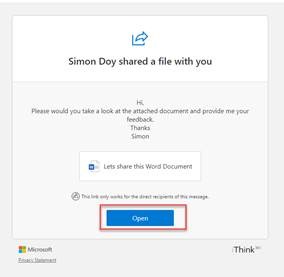
So, the user will receive an email like the one shown below.
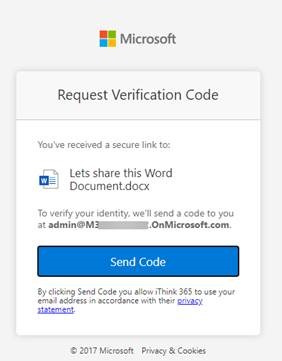
They simply click on Open. They will then asked to verify their identity via verification code.
Click on “Send Code”. An email will be sent with a verification code like shown below.
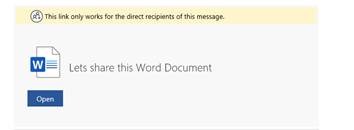
Take the code, copy and paste into verification screen as shown below.
The user is now shown the content.
The person who shared the content will get a helpful email telling you it has been accessed.
How to stop Sharing Content
Eventually you may want to stop sharing the content. This might be because you made a mistake and invited the wrong person or the content is out of date.
Fortunately, One Drive has a great feature:
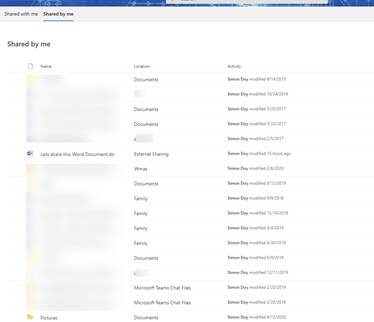
– Shared by me
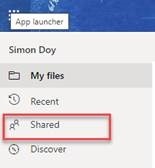
This feature allows you to see all the content that you have shared with others. From One Drive, click Shared from the left-hand quick launch menu.
Across the top of the screen are two tabs:
– Shared with me
– Shared by me
Click on Shared by me
Now all the files that you have shared with others will be displayed. The files that have been shared do not have to be hosted in One Drive, they may also be from SharePoint or Microsoft Teams.
Selecting the content that we shared earlier and choosing “Manage access” will allow us to see who currently has access.
The Manage Access right-hand task pane will be displayed as shown below.
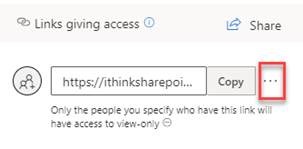
Remove access by removing the link access.
Click …
The Link settings screen will be displayed, click on the X next to the link.
Confirm the deletion of the link by clicking “Delete link”.
Wait a moment and the content will be removed from the “Shared by me” window.
Thanks for reading
Thanks for reading, I aim to add subsequent guides to explain how to share content using other Microsoft 365 platforms such as SharePoint Online and Microsoft Teams.






 , This can be confusing, and this guide aims to help you with that confusion.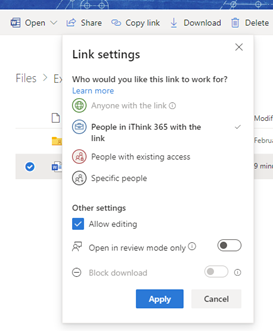












 Doy's Microsoft 365 and Azure Dev Blog