
Simon looking for missing components in his agent.

Missing Topics And Agent Components in your Deployed Copilot Studio Solutions? Try This


Introduction

If you are being good, when building your Copilot Studio Agents, you’ll be using Solutions to deploy your agents. You’ll be deploying your agents from a development environment through your test and production environments.

If you are not, then take a look at my series of blog posts, which show you how to setup Dev Ops pipelinest which will get you up and running.

Solutions are great, but Copilot Studio does have a habit of not playing ball sometimes, and it’s not always solution-aware.

The issue

Let me tell you a story.

So, you build v1.0 of your Copilot for Finance.

You deploy the solution using an automated pipeline to move the solution from Development, Test to Production.

You publish your agent into Microsoft 365 Copilot and deliver it to your users.

They are super happy with it, and they use it to boost their business and team productivity. Finally, you are getting an ROI on Copilot!

Then they say

“Simon, it would be good if the Copilot for Finance would help us with our month-end tasks. Can you get the Agent to help us collate our reports and do the month end reconciliation tasks?”

You are excited to look at this new feature, and you, of course, agree to deliver this!

So, you start v2.0 of your Copilot Agent, and you add a new topic and a new AI Model to your Agent, and it’s all working in development.

Awesome!

You kick off your Azure DevOps pipeline to deploy v2.0 of your agent into testing. This allows the users to test it before it goes to production.

You fire up the Copilot in Test, but wait a minute, the topic isn’t there, and it’s not working.

What’s going on?

You go back to development and publish the Solution again. You start the deployment, but nothing changes its still the same.

What’s going on?

Well, it turns out that Copilot Agents, when new components are added, the agent doesn’t always add these components to your solution!

So what can you do?

Well, the easiest way is to remove the agent component from the solution. Don’t delete it from the environment!
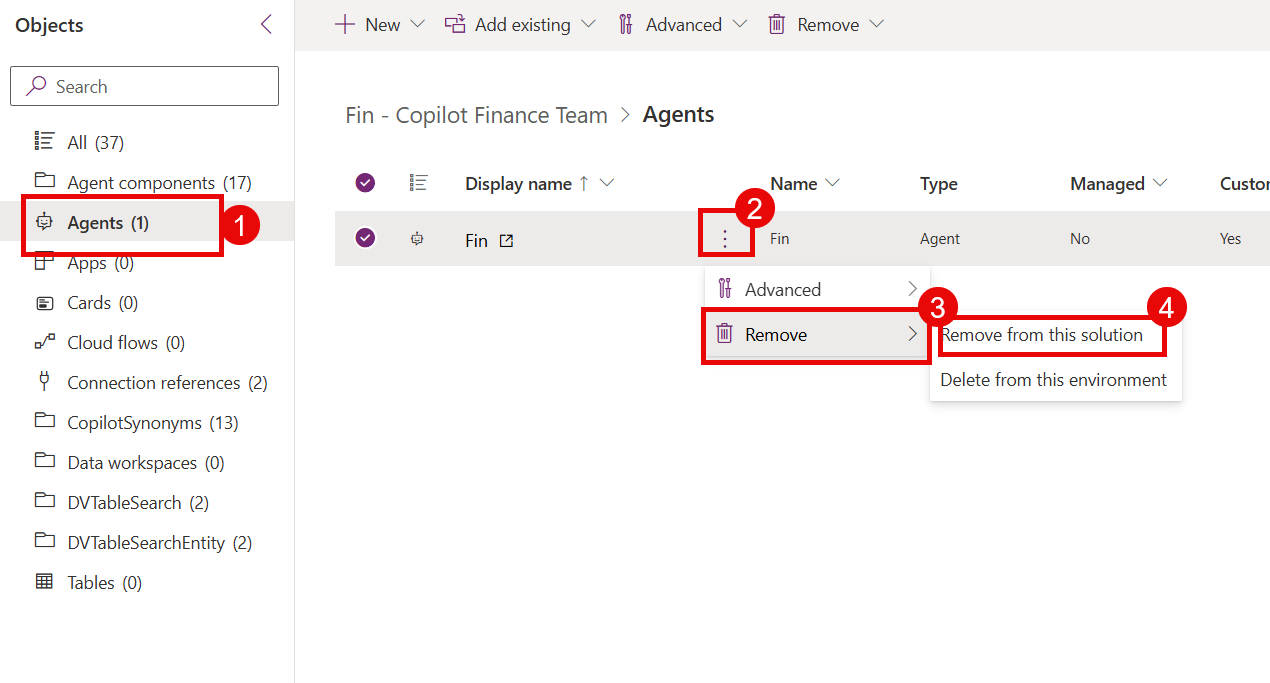
This will take the agent and all components out of the solution.

Now simply add the agent back into the solution.
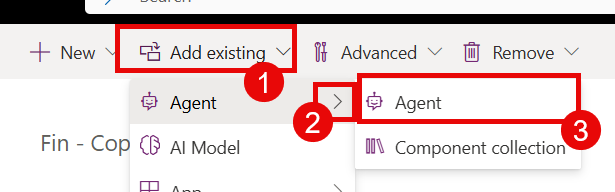
Next, run your pipeline to export the solution from Dev to Test.

Now you are all set; the solution includes your topic and its missing components.

The users are ecstatic and the agent is now helping them with their month-end tasks.

You push your agent to production, and you are done!

Excellent work.

Conclusion

Copilot Studio is not always aware of solutions and can miss adding components, such as newly added topics and AI models.

However, now you know, and hopefully this tip can save you time from diagnosing these deployment issues in the future.

Hope that helped ….

…. Then the phone rings and they are asking for a new feature, this time it’s to help with year-end…

… Good luck!

PowerShell to Detect Web Configuration Modification jobs


Introduction

Over the past few months I have been working on some automated SharePoint deployment scripts using Team Foundation Server and the TFS build service. As the development became more complex so did the scripts. One of the problems we had to work around was activating a number of features at the same time.

The deployment reinstalls five SharePoint solution packages, uninstalling and reinstalling all of the Features which are packaged in the solutions. Now some of these features perform custom tasks using feature receivers. For example making changes to the web.config using SPWebConfigModfications. However, one of the problems with modifying web.config using feature receivers is that if they are run on a multi server SharePoint farm then the modifications are performed using a timer job.

When you try and activate two features, one after the other, which perform the web configuration modifications you get the following error message:-

"A web configuration modification is already running"

This kills the deployment script!

Thus we needed to find a way to detect whether a web configuration modification job is in progress.

Understanding the process was made more dificult as the development machine was part of a single server SharePoint farm. With single server farms, when aa SPWebConfigModification is applied to a SPWebApplication then the modification is executed in a different manner and occurs immediately.

Anyway, after some digging about using Reflector I found an SPJobDefinition which looked like the web config modification timer job and say down and wrote the following PowerShell script.

Solution

To be able to detect whether a web config modification is running we need to see if a timer job is active.

The timer job that performs the web config modification has the name “job-webconfig-modification”.

To detect whether a web configuration is pending or running.  As web configuration operations occur against a web application. Therefore using the SPWebApplication’s SPWebService property which has two collections relating to the timer service:-

  • JobDefinitions – this contains the jobs that are pending to be run
  • RunningJobs – this contains the jobs that are currently running

Detecting whether a web configuration modification is in progress, we need to check those two collections for our “job-webconfig-modification” timer job.

The following PowerShell function, IsWebConfigModificationJobPendingOrRunning, is used to check whether a Web Configuration operation is taking place. The function takes a SPWebApplication as a parameter and returns true if the web configuration modification operation is running.


################################################################################################
#Function: IsWebConfigModificationJobPendingOrRunning
#Description: Checks to see if a web configuration job is pending or in progress
################################################################################################
function IsWebConfigModificationJobPendingOrRunning([Microsoft.SharePoint.Administration.SPWebApplication] $webApp)
{
Write-Host "IsWebConfigModificationJobPendingOrRunning() Enter";

$bRunning=$false;
try
{
$webConfigPendingJobCount = 0;
$webConfigRunningJobCount = 0;

#if there is only one job returned then array is not created
$webConfigPendingJobs = $webApp.WebService.JobDefinitions |
Where-Object {$_.Name -like "*job-webconfig*"};
$webConfigRunningJobs = $webApp.WebService.RunningJobs
| Where-Object {$_.Name -like "*Web.Config*"};

#if there is only one job returned then array is not created - check to see if an object has been returned
#check to see if its an array if not then presume its a job.
if($webConfigPendingJobs -ne $null)
{
if($webConfigPendingJobs.GetType().BaseType.Name -eq "Array")
{
$webConfigPendingJobCount = webConfigPendingJobs.Count;
}
else
{
$webConfigPendingJobCount = 1;
}
}

#if there is only one job returned then array is not created - check to see if an object has been returned
#check to see if its an array if not then presume its a job.
if($webConfigRunningJobs -ne $null)
{
if($webConfigRunningJobs.GetType().BaseType.Name -eq "Array")
{
$webConfigRunningJobCount = webConfigRunningJobs.Count;
}
else
{
$webConfigRunningJobCount = 1;
}
}

Write-Host "Found " $webConfigPendingJobCount " Pending Jobs and " $webConfigRunningJobCount " Running Jobs";
if(($webConfigPendingJobCount -gt 0) -Or ($webConfigRunningJobCount -gt 0))
{
$bRunning=$true;
}
else
{
$bRunning=$false;
}
}
catch
{
Write-Error "IsWebConfigModificationJobPendingOrRunning Exception: $_ ";
}

Write-Host "IsWebConfigModificationJobPendingOrRunning() Exit : $bRunning";
return $bRunning;
}


Example Script

The script below shows part of the deployment script. This would be used  to loop through an array of feature names, check their scope and activate them. The script waits until the feature has activated and checks that there are no web configuration modification jobs running.

$SharePointWebApp = Get-SPWebApplication "http://sharepoint";
$spfeature = "Feature1";

$checkspfeatureactivation = Get-SPFeature -WebApplication $SharePointWebApp
-Identity $spfeature -ErrorAction SilentlyContinue;

if($checkspfeatureactivation -eq $null)
{
Write-Host "Activating Feature: " $spfeature.Name " Scope: " $spfeature.Scope;
Enable-SPFeature -Identity $spfeature -Url $SharePointWebApp.Url -Confirm:$false;

#check that web config job mod not running, wait if it is
do{
Start-Sleep -Seconds 2;
Write-Host "Waiting for Web Config Job to be Completed";
$configJobRunning = IsWebConfigModificationJobPendingOrRunning $SharePointWebApp;
}while ($configJobRunning);

}
else
{
Write-Host "Feature Already Activated: " $spfeature.Name " Scope: " $spfeature.Scope;
}


I hope that helps someone who is having similar problems, I hope to add a bit more about the deployment process that I have been developing in later blog posts.

Please leave comments if you need any help or there are any problems.

Here are the actual PowerShell scripts as txt files.