An illustration of an airplane being flown from the position of the cockpit.

Gotchas discovered building a Custom Engine Copilot with GPT-4o and Copilot Studio


Introduction

This article highlights some gotchas that I have hit when building a Copilot Studio with a Custom Engine Copilto using GPT-4o. The aim is to help you solve these problems if you have similar issues.

So, firstly what are we talking about when we talk about Custom Engine Copilots?

Well, Copilot Studio can be configured to use an external hosted AI model for example using Azure AI Services and GPT-4o. This allows us to use a more powerful or more suitable language model such as GPT-4o instead of the out-of-the-box LLM that Microsoft currently provide.

The benefits are better reasoning with better results. Our experience with our customers has shown some great results when using GPT-4o.
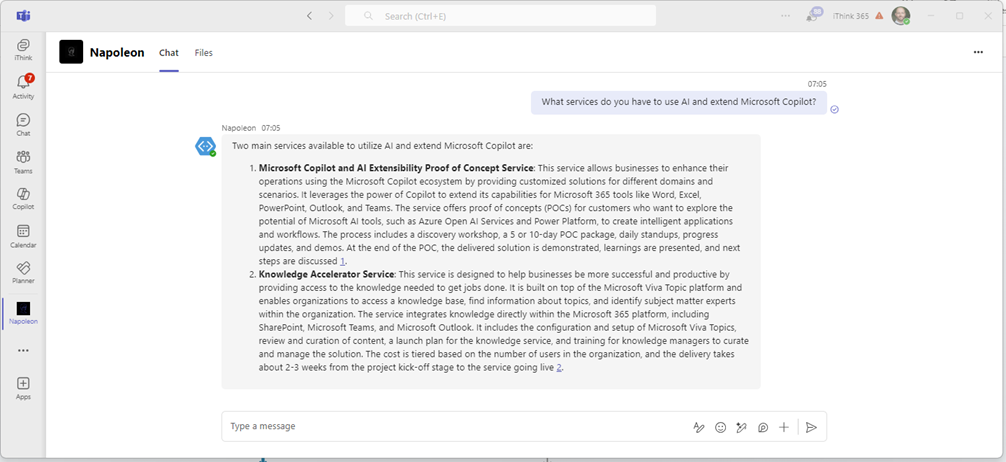
The way of using a custom engine Copilot is using the Generative Answers capability within Copilot Studio.

However, there are some gotchas when using these more complex models and I wanted to document them here to save you working out what the issue is.

Gotcha 1: Generative Answers returns no knowledge found

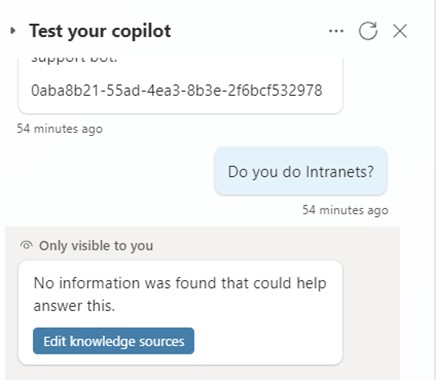
So, we have seen that if something goes wrong when you using Open AI Services then you get a no knowledge found.

You can try this out using the Test Your Copilot feature for your Copilot with Copilot Studio.
I will be honest this took a while to find out what the issue was but by using Azure Open AI Services https://oai.azure.com/ you can test the model to make sure it is working with your data.

We kept getting issues with Generative Answers saying there was no knowledge found. In the end, it turned out to be due to a trailing slash missing for the Azure AI Search endpoint.

So check your Open AI connection settings, make sure that you have a trailing slash on the Azure AI Search / Cognitive Search endpoint URL.

i.e https://azureaisearch.search.windows.net/

and not https://azureaisearch.search.windows.net

We have also seen the issue with your model being throttled and the result is that you get the same no information was found that could help answer this.

When you try the same prompt from Azure Open AI Services you get this error message, Server responded with status 429, the rate limit is exceeded.

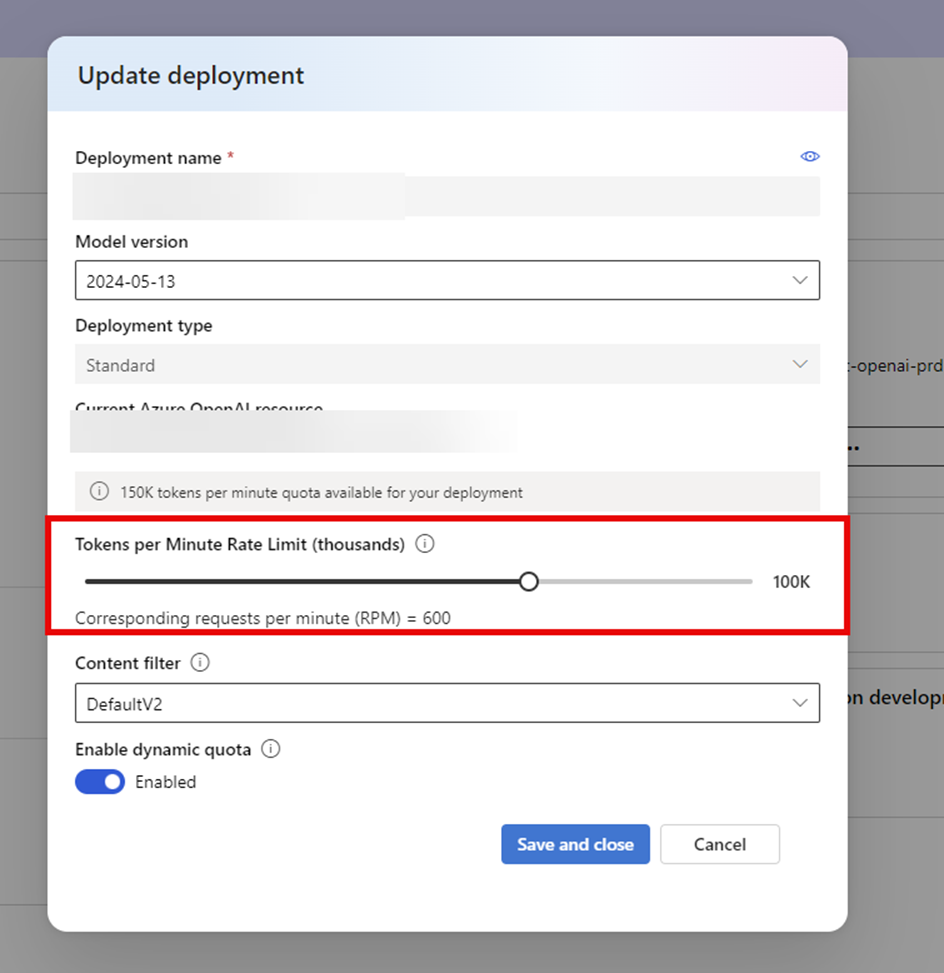
Make sure you have increased the rate limit to cover the number of tokens that need to be processed.

You can do this using the Azure Open AI Studio by going to the Deployments, choosing your model and then editing the model settings and increasing the Tokens Per Minute Rate Limit. For testing we are setting this to 100K but for Production, you are likely to need to increase further.
Gotcha 2: Generative Answers returns answers but they are not that great.

This issue is subtle and is unfortunately hidden by the Generative Answers. The experience that we were getting was that using Azure Open AI Services we got really good detailed responses back. However, when we tried the same prompt in Copilot Studio we got very simple responses back which were nowhere as good as those from Azure Open AI Services.

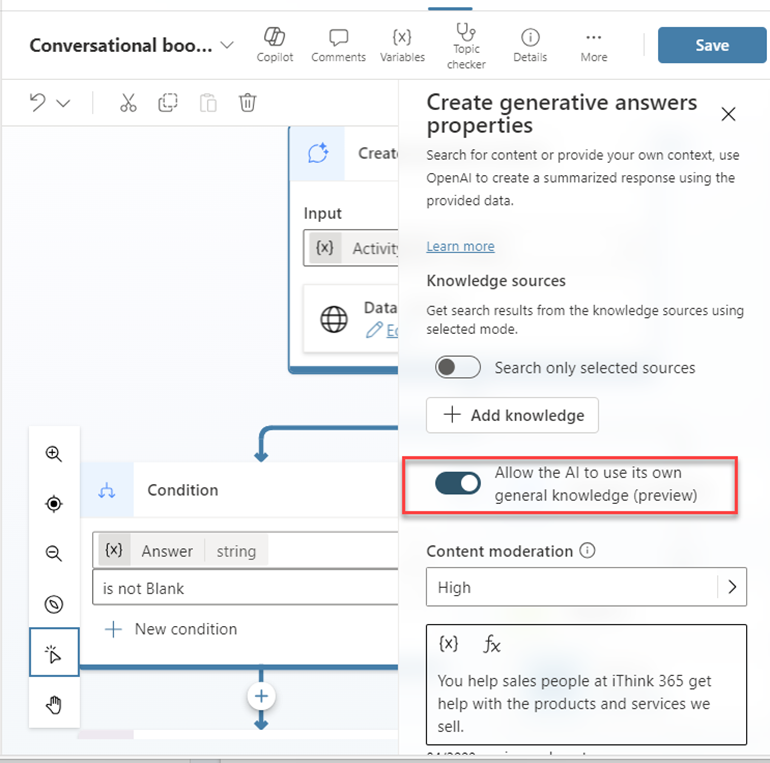
The issue turned out to be related to Gotcha 1 where we were getting no results back from the Open AI model and we had this option switched on in the Generative Answers action. So then the Generative Answers would use the knowledge that it has in its model.
So we would get a response like this one
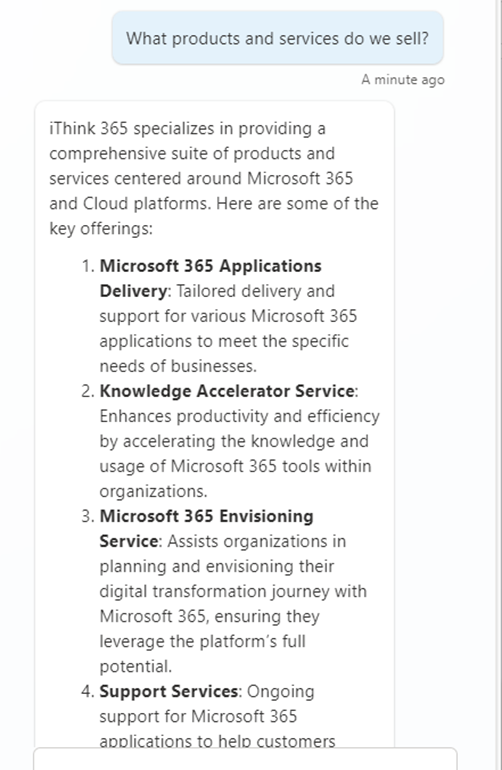
Which is not bad but not as good as the GPT-4o version which is shown below.

So the fix is to switch off the “Allow the AI to use its own general knowledge” option.

Gotcha 3: Generative Answers sometimes return great answers and sometimes errors out.

So this issue seems to occur with GPT-4o models but not GPT-4 based models and I suspect that this is down to the amount of detail in the answers coming from the model.

When using Generative Answers and Copilot Studio you can return the information back to the user in two ways:

  • Ask Generative Answers to send a message to the user.
  • Take the response and assign it to a variable.

These options can be found in the Advanced section of the action.
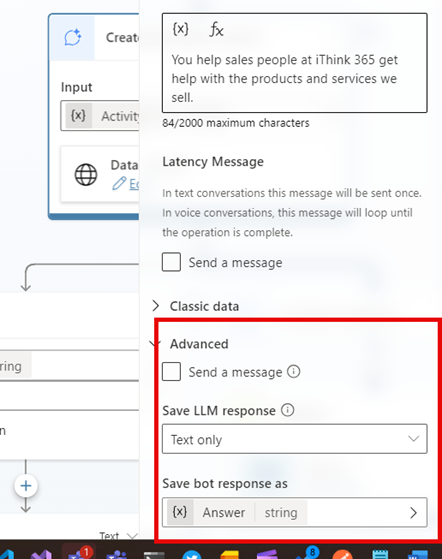
If you ask for generative answers to send a message then you sometimes get errors being reported.

Instead do the following:

  • Assign the response from the model into a variable, use Text Only.
  • Check to see if a response is returned and then if it is write out the message using a Send a message activity.

See the following screenshot:
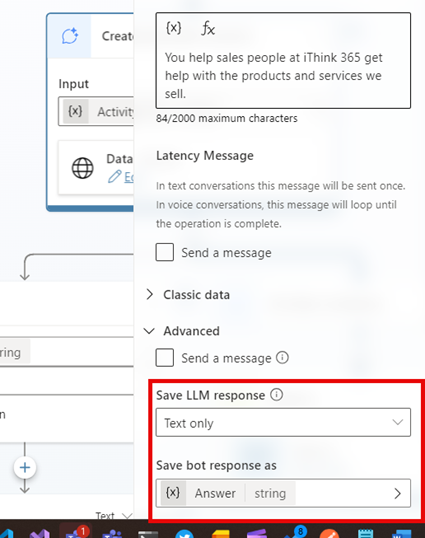
Once you have assigned the LLM response to the variable then add the condition and do the following:
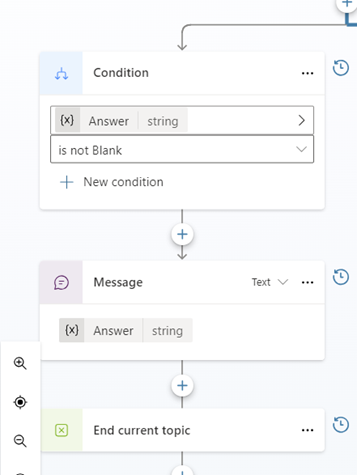
You will find the responses much more reliable.

Conclusion

In this blog post, I explain some of the issues/gotchas that I have seen when building Custom Engine Copilots using GPT-4o. We covered some of the issues that I have seen and provided ways to solve them.

I hope that helps!

if you need a hand then get in touch with us at iThink 365, https://www.ithink365.co.uk.

Working with Copilot Studio Dynamic Chaining Plug-in Actions DateTime Parameters


Introduction

I have been spending a lot of time recently working with the Copilot Studio’s Dynamic Chaining feature using actions and plugins.

If you have not heard of the feature have a read of this Microsoft article, Use Plugin Actions in Copilot Studio (Preview)

In a nutshell, the incredibly powerful feature of dynamic chaining is that the AI can decide based on descriptions provided by the Plug-Ins which ones they should call based on the user’s request via the prompt.

The key to a successful plug-in is the way that you describe the plugin function. It needs to be in a way that the AI can understand when it should try and use that plugin. Another part of writing successful dynamic chaining plugins is spending time when describing the plugin input and output parameters. It is this aspect that I wanted to talk about today.

In this article, I wanted to show some of the things I have discovered when working with date time parameters.

In my example, we have a plugin which is running a Power Automate Flow. The ability to call a Power Automate Flow from a plugin is awesome. It allows us all sorts of freedom including allowing us to connect with different systems and make them available to the Copilot. However, one of the challenges is how we ensure that the parameters being passed into the Flow are of the right data type and format.

Let’s think about an example where we have a Power Automate that connects to a Dataverse-backed system which holds the people who are on leave. The plug-in returns an array of people who have booked leave during those two dates. The flow is set to take two parameters, StartDate and EndDate. Both parameters are strangely of type string but this works well and we can work with that in Power Automate nicely.

Our Power Automate then does a look-up against Dataverse and filters the results using the Start Date and End Date parameters.

We hook up an Action (Plugin) which calls the Flow and you try it out with the following prompt.

“I am looking to book a holiday between 1st May 2024 and 14th May 2024, is anyone else on holiday?”.

The chatbot fires up and calls the plugin as it has worked out that it needs to call our “Get people who are holiday” plugin. However, it fails because the format of the date is not right. It is expecting a date like 2024-05-01 or yyyy-mm-dd.

The error we get is this:

So, the question is how can we fix this? Well we have a couple of choices, we could put some more logic in the Flow to parse the string and turn it into the right format. We might use a parseDateTime() function but unfortunately that suffers the same fate as we had when the Flow is called and the format is not right for it to parse. Instead we could use a couple of AI Prompts using Create text with GPT and the AI Extraction. We tell the prompts to parse our Start Date and End Date and format the result as yyyy-mm-dd.

How does that work for us?

Well it works like a dream the AI prompt will format whatever is passed to us, provided it is a date into the right format and we get the results back.

Awesome!

However, what about if we wanted to do something a bit cooler and have a prompt like this.

“Is anyone on holiday in May?”.

Unfortunately, this does not work, the Plugin does not know what date to put in as the start date and end date from this prompt. It needs a bit of help.

So, what would happen if we changed the description of the parameters, Start Date and End Date in the plugin?

This was updated from

“This provides the start date for the holiday, leave or vacation.”

to

“This provides the start date for the holiday, leave or vacation. This could be as a date or month, if it is a month then it should be the first day of the month of the current year such as 1st May 2024.”

What effect does that have?

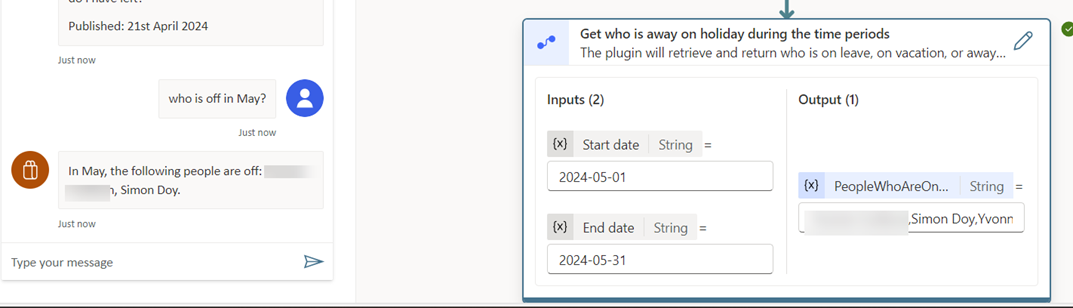
Now suddenly we can ask the question “Who is off in May?”.

The plugin would get the parameters 1st May 2024 and 31st May 2024 used for Start Date and End Date respectively.

It is better than that, we can now say “Is anyone on holiday in Q1 2024?”

The plugin would then set the parameters to 1st January 2024 and 31st March 2024.

How cool is that?

During my experiments, I wondered why we might not need the two steps in Power Automate to convert the Start Date and End Dates into the right date-time format. Instead, what about if we use the Plugin Parameter description to do that work.

So if we update the prompt to tell it to use the format “yyyy-mm-dd” and then try it.

This worked like a charm and now the prompts were working and converting the dates into the right format and I could simplify the Flow.

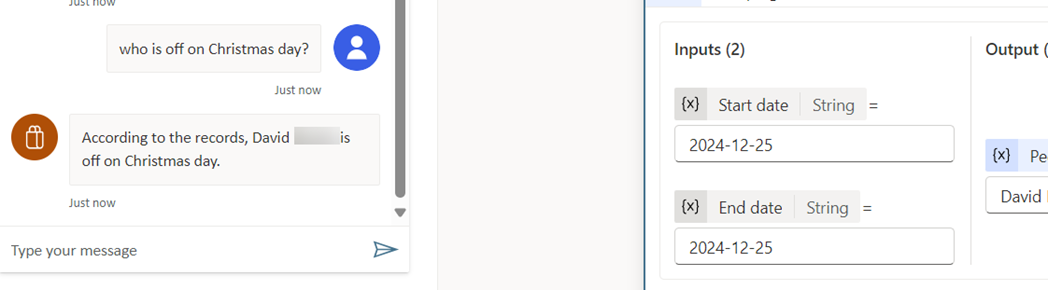
What is more, I could then start asking questions like “Is anyone off on Christmas Day?” or “Is anyone off on Boxing Day?” or “Is anyone off on Star Wars Day?”

The Flow would be given the right parameters and we would see who is off.

Conclusion

So there we have it, with a bit of experimentation and thinking about the use cases there is a lot of power in the Plugin Parameter description. With the description we can get the system to do the hard work of formatting data into the structure that you need.

I hope that you found this useful and let us know how you get on.