


So, I have been following the Model Context Protocol (MCP) world for a while now. I first heard about MCP just as we were going out to MVP Summit in March 2025.
Already, the Microsoft Copilot Extensibility team were on the case with people like Fabian Williams experimenting with them. I have been following this space, reading articles and finally, over the summer, I have had some time to roll up my sleeves and look at how I would build an MCP Server. Primarily with the aim of making it available to Microsoft 365 Copilot via Microsoft Copilot Studio and the Microsoft 365 Copilot extensibility world.
This article will be part of a blog series that describes the trials and tribulations of building an MCP Server.
The MCP Server I wanted to build was for a small demo that I wanted to create. The aim was to bring together Multi-Agents and MCP. The goal to create a solution that allows a marketing person to create a Marketing Campaign which describes a story for an ideal client and then allows the the creation of social media content on LinkedIn.
The idea was that we would have four Agents
- Marketing Campaign Agent
- Social Media Content Creator Agent
- LinkedIn Posting Agent
- Marketing Content Quality Assurance Agent
The plan was to make these agents available through Microsoft 365 Copilot and build them using Microsoft Copilot Studio. Multi-Agent support was launched at Microsoft Build 2025 in May and was made available to us in June 2025.
My first step was to sit down and started to do some investigation. I needed to answer questions such as:
- How do we host MCP Servers?
- How do we secure them?
- How do we build them, deploy them, debug them?
Research
Like all good developers / solution architects / vibe coders …. I needed to get stuck in and we know we should research things first. Well, I ignored that for about an hour and then I thought I better understand how to build things before going any further.
So, I did a bit of researching and found a great article on building MCP Servers which were hosted within Aspire by Oleksii Nikiforov, here is the link to his posts.
- Simplifying Model Context Protocol (MCP) Server Distribution with .NET Global Tools
- Simplifying Model Context Protocol (MCP) Server Development with Aspire
From these posts I learnt a bit more about Aspire (which I have heard a lot about but never tried) and MCP Inspector which I had not heard about but quickly got to grips with.
The tutorials that Oleksii has put together are great and I quickly had an MCP Server running through Aspire which I could connect to with MCP Inspector.
Microsoft Product Groups are busy writing a number of different frameworks to build MCP Servers and the one that has a lot of momentum behind it is the MCP .NET SDK, https://github.com/modelcontextprotocol/csharp-sdk
The other framework that caught my attention, is the Microsoft Azure Function MCP Server Framework, which can be found on Github, https://learn.microsoft.com/en-us/samples/azure-samples/remote-mcp-functions-dotnet/remote-mcp-functions-dotnet/
I must admit I really like the idea of MCP Servers with Azure Functions. There are some great videos of how to build MCP Servers with Azure Functions and we will delve into them a little bit later.
However, from the research that I did it seemed that most people were building MCP servers using Containers, so I thought I will start there with the .NET SDK and using Oleksii’s approach.
There was quite a bit to learn which I will talk about next and then in the next blog post I’ll delve into building out the MCP server with the different approaches.
The final bit of research that I did was read about the MCP specification here, I will be honest I read it and got a bit more of an idea, but those RFC documents are hard work.
However, the MCP website is much nicer and easy to understand, so here is a link to the MCP Specification, https://modelcontextprotocol.io/specification/2025-03-26/basic
Microsoft 365 Copilot was quite good at giving me an overview of the protocol.
Overview of MCP Protocol
MCP is built on JSON-RPC, using UTF-8 encoded messages for communication between clients and servers. It supports multiple transport mechanisms, allowing flexibility depending on deployment needs.
To understand the relationship between the different components have a read of the lifecycle process for the Model Context Protocol, https://modelcontextprotocol.io/specification/2025-06-18/basic/lifecycle.
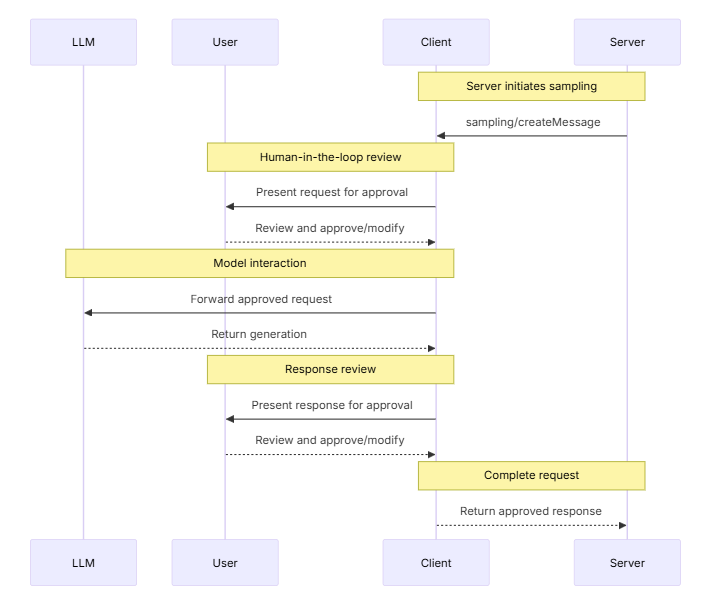
MCP and Authentication
MCP and Authentication has been evolving and an area which was missing at the initial launch of MCP is now defined. I suspect that this will change and evolve with feedback.
I found the following guide really useful to understand Auth and its direction from this post by Den. Of course, these posts are going to be great. Den is one of the core maintainers of MCP and has some great articles and insights as to the design decisions.
OAuth In The MCP C# SDK: Simple, Secure, Standard · Den Delimarsky
https://den.dev/blog/mcp-csharp-sdk-authorization/
MCP Inspector
First, let’s talk about some tools and we should start with the MCP Inspector (https://github.com/modelcontextprotocol/inspector). This tool seems like the go to tool when testing out MCP Servers. I am sure there are more out there and I will be doing some research into those tool as well.
However, the tool looks like this:
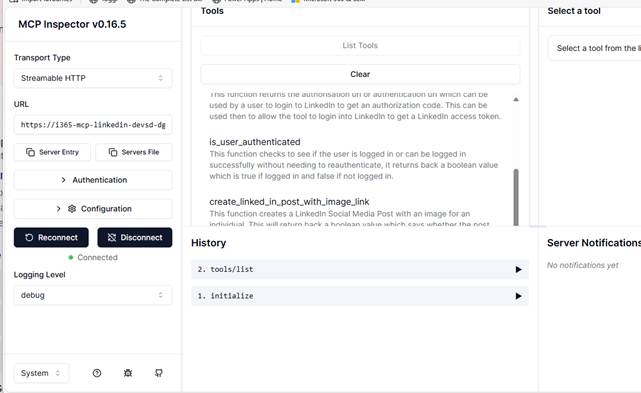
The MCP Inspector allows you to integrate your MCP Server which is great, it supports Authentication via OAuth2 or Bearer Token.
Additionally it supports the main MCP Server Transports which will talk about shortly.
The solution that Oleksii has put together embeds a version of MCP Inspector and makes it easy to use. However, I found that this was an older version and got into the habit of using the following command to run the latest version of MCP Inspector from the cmd line.
npx @modelcontextprotocol/inspector dotnet run
I’ll be honest I do not remember using npx (Node Package Execute) before, but it has been around for a while. It is an amazing tool which is part of the npm-cli and npm package (Node Package Manager). It enables Node.js packages to be executed directly from the npm registry.
The other advantage of using npx to run MCP Inspector is that you can see what the MCP Inspector is up to more easily as it outputs logs to the command line.
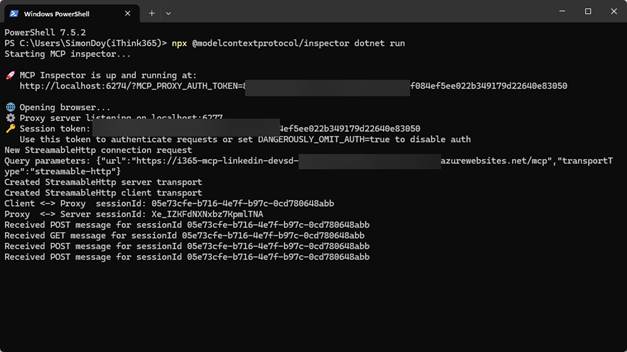
MCP Transport Types
One of the first things that I needed to get my head around was the different MCP Transport types. These different communication protocols are used to enable MCP in different scenarios.
Let’s talk about these next.
STDIO Transport
This is the most lightweight and direct transport method.
- How it works: The client launches the MCP server as a subprocess.
- Communication:
- Messages are sent via stdin and received via stdout.
- Only valid JSON-RPC messages are allowed—no embedded newlines.
- Logging (if any) is done via stderr.
- Use case: Ideal for local development or tightly coupled systems where simplicity and low overhead are key
STDIO Transport allows a local MCP Client to instantiate and run a local MCP Server and talk to it through the command line. This is great for local MCP Clients like Visual Studio Code and Github Copilot, Claude etc
SSE (Server-Sent Events)
This was the original streaming mechanism used in earlier versions of MCP.
- How it worked:
- Clients would initiate an HTTP connection and receive a stream of server messages via SSE.
- It allowed for real-time updates without polling.
- Limitations:
- SSE is unidirectional (server-to-client only).
- It lacked flexibility for more complex bidirectional communication.
- Status: Deprecated in favour of Streamable HTTP as of protocol version 2025-03-26
This is currently the transport of choice for MCP Servers built on Azure Functions, which caused me problems and made me rethink that approach. I know that the Azure Functions team will be working on resolving this issue.
Streamable HTTP (Current Standard)
This is the modern, flexible transport replacing SSE.
- How it works:
- The server runs independently and handles multiple clients.
- Clients send JSON-RPC messages via HTTP POST requests.
- The server can respond using either standard HTTP responses or SSE for streaming.
- Security Considerations:
- Servers must validate the Origin header to prevent DNS rebinding attacks.
- Local servers should bind to localhost only.
- Authentication is strongly recommended.
- Use case: Best for scalable, production-grade deployments where streaming and multi-client support are needed
This is the current flavour of the week and if you are building MCP Servers that are going to run over a network then this is the approach you should be taking.
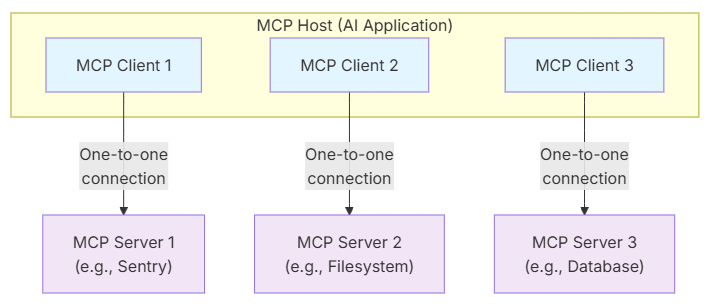
MCP Client
We are nearly at the end of this blog post, and I have not really talked about the MCP architecture and to be honest there are some great resources out there that do this. However, we need to talk about the main parts to an MCP ecosystem. The MCP Client is the consumer of MCP Servers. The MCP Inspector is an example of an MCP Client it can connect to an MCP Server, discover the resources, tools and how to authenticate from the MCP Server.
I can see that more and more tools will have MCP Clients built in to allow them to consume MCP Servers and use their capabilities.
For more information on the MCP Client, read https://modelcontextprotocol.io/specification/2025-06-18/client/roots
MCP Server
The MCP Server is part of the MCP architecture which exposes, resources, tools and prompts via the MCP primitives. They operate as independent components and should be built with a focused set of capabilities.
I am really fascinated to see how the protocol evolves to handle the challenges with different authentication approaches and types but this all happens and is described by the MCP Servers.
Fundamentally though the MCP Clients learn what is available for them by discovering the resources and tools when they interrogate the MCP Server.
Conclusion
In this blog post I set the scene for what I have been up to with my adventures into the Model Context Protocol space. I have tried to document my journey and resources that I have discovered. I talk about some of the components and tools and link to the resources that I hope you find useful.
In the next blog post I am going to talk about my experiences with building MCP Servers with the MCP .NET SDK and delve into different hosting models and the challenges with them as you look to build secure and encrypted MCP Servers.
Please connect with me on LinkedIn and Bluesky and would love to hear how you are getting on with building MCP resources.

 Doy's Microsoft 365 and Azure Dev Blog