

Introduction
If you are being good, when building your Copilot Studio Agents, you’ll be using Solutions to deploy your agents. You’ll be deploying your agents from a development environment through your test and production environments.
If you are not, then take a look at my series of blog posts, which show you how to setup Dev Ops pipelinest which will get you up and running.
Solutions are great, but Copilot Studio does have a habit of not playing ball sometimes, and it’s not always solution-aware.
The issue
Let me tell you a story.
So, you build v1.0 of your Copilot for Finance.
You deploy the solution using an automated pipeline to move the solution from Development, Test to Production.
You publish your agent into Microsoft 365 Copilot and deliver it to your users.
They are super happy with it, and they use it to boost their business and team productivity. Finally, you are getting an ROI on Copilot!
Then they say
“Simon, it would be good if the Copilot for Finance would help us with our month-end tasks. Can you get the Agent to help us collate our reports and do the month end reconciliation tasks?”
You are excited to look at this new feature, and you, of course, agree to deliver this!
So, you start v2.0 of your Copilot Agent, and you add a new topic and a new AI Model to your Agent, and it’s all working in development.
Awesome!
You kick off your Azure DevOps pipeline to deploy v2.0 of your agent into testing. This allows the users to test it before it goes to production.
You fire up the Copilot in Test, but wait a minute, the topic isn’t there, and it’s not working.
What’s going on?
You go back to development and publish the Solution again. You start the deployment, but nothing changes its still the same.
What’s going on?
Well, it turns out that Copilot Agents, when new components are added, the agent doesn’t always add these components to your solution!
So what can you do?
Well, the easiest way is to remove the agent component from the solution. Don’t delete it from the environment!
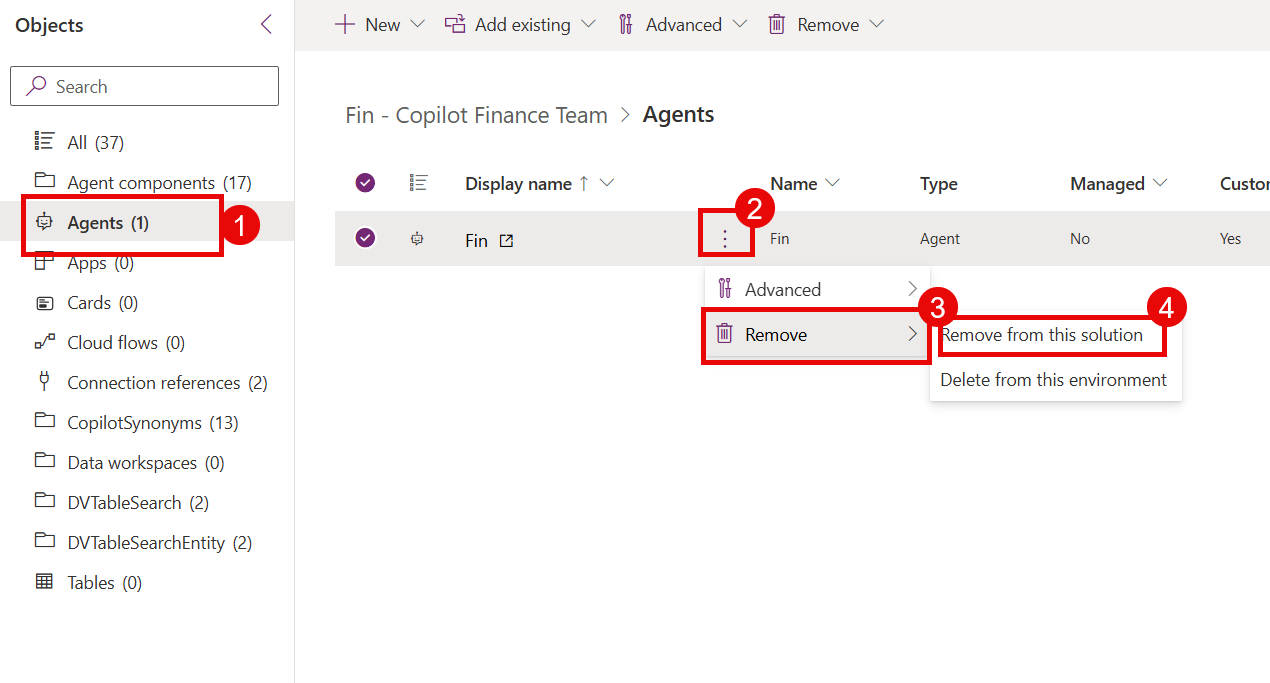
This will take the agent and all components out of the solution.
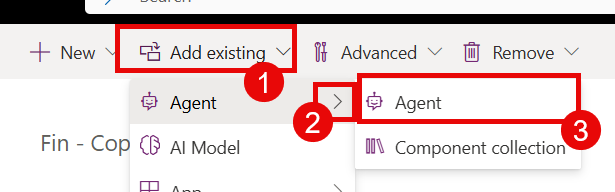
Now simply add the agent back into the solution.
Next, run your pipeline to export the solution from Dev to Test.
Now you are all set; the solution includes your topic and its missing components.
The users are ecstatic and the agent is now helping them with their month-end tasks.
You push your agent to production, and you are done!
Excellent work.
Conclusion
Copilot Studio is not always aware of solutions and can miss adding components, such as newly added topics and AI models.
However, now you know, and hopefully this tip can save you time from diagnosing these deployment issues in the future.
Hope that helped ….
…. Then the phone rings and they are asking for a new feature, this time it’s to help with year-end…
… Good luck!
 Doy's Microsoft 365 and Azure Dev Blog